blog

Social media has taken over much of the internet and our lives, yet how much do we know about how it works? Just how popular is it? How is it changing over time to meet the needs of our social lives? There is so much to learn and to potentially find out, and yet so little time to do so for most people. We were interested ourselves and knew our readers would be as well, so we looked into the topic and found some key points and facets to talk about. As one would expect, social media is changing rapidly, and in important ways. 

Data and careful study has provided us with most of the answers to the questions above, and an educated guess on the rest. Therefore, let’s start with those points. Here are 10 social media statistics that will give you an overview of the industry landscape in 2025: 

1. There are 5.56 Billion Global Social Media Users

As of April 2025, there are 5.24 billion social media user identities across the world, and that has only grown. This totals about 63.9% of the world’s population. It is clearly a huge market, but it also shows some room for growth. There will be people who will never adopt social media for one reason or another (and for better or for worse), but there will always be such cases when it comes to technology. 

What is interesting, though, is that the market so far is mostly saturated as far as internet users are concerned. From the same source, there are 5.56 billion internet users in one form or another. Realistically, internet users have more than one social media profile. Both the number of social media identities and internet users continues to climb as internet adoption becomes more common around the world.  

A few things to note here are that the population of people aged 13 and under cannot be counted as users in most instances, as platforms restrict usage.  

2. People Spend an Average of 2 Hours, 23 Minutes on Social Media Each Day

People use social media a lot more than they might admit. In fact, people spend nearly 143 minutes every single day on social media. That’s about 16.6 hours a week for a quick calculation.  

Surprisingly, this is the first time in 12 years that time spent on social media has gone down and not up. While 2 hours and 23 minutes a day might sound like a lot, it’s down significantly from 2023’s highest recorded average of 2 hours and 31 minutes. Even though it’s just a few minutes difference, we haven’t seen social media average use times like this since before the COVID-19 pandemic. To put it in perceptive, social media users averaged 142 minutes a day in 2018 and 90 minutes in 2012.  

Remember, these numbers are averages, meaning there are users spending a bit more than one day out of each week on social media. That’s a lot of time and a significant amount of attention going into these apps. Some users might check one account once a month for messages from family and not engage with the platform otherwise. Others use social media for work, or they’re trying to break through the competitive influencer market. Either way, time spent on social media is just one part of the equation; the other is how you’re using it.  
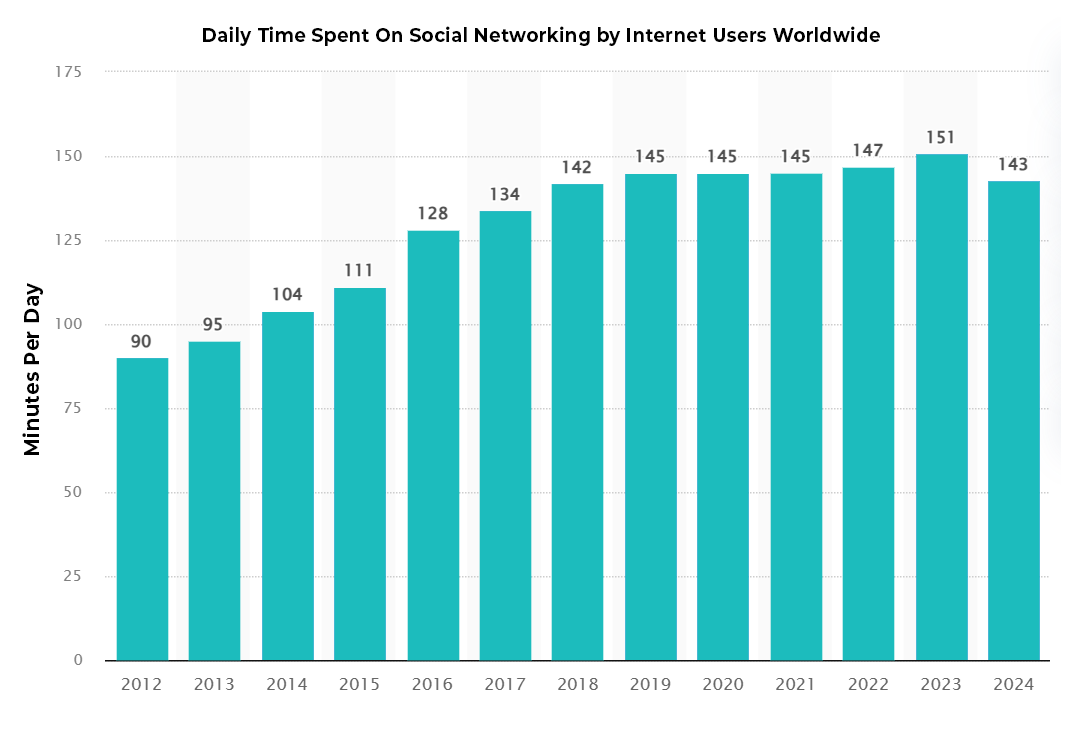
Social networking usage graph

3. The Average Person Uses 6.8 Different Social Media Platforms Each Month

How many social media apps do you regularly use? While you have your favorites, for sure, there is likely a good number of platforms where you have accounts but rarely, if ever, log in. Or there are platforms you might use without realizing it’s considered a social platform, like WhatsApp or YouTube.  

The average person uses 6.8 platforms in total each month. Again, this brings us back to the number of social media identities around the world. If you have one social media account, you likely have more!  

The top apps across the world are YouTube, WhatsApp, Facebook, Instagram, TiktTok, Messenger, Telegram, Snapchat, X, Pinterest, Discord, Threads, LinkedIn, Line and Reddit. 

4. Facebook Is Still the Most Used Social Media Platform

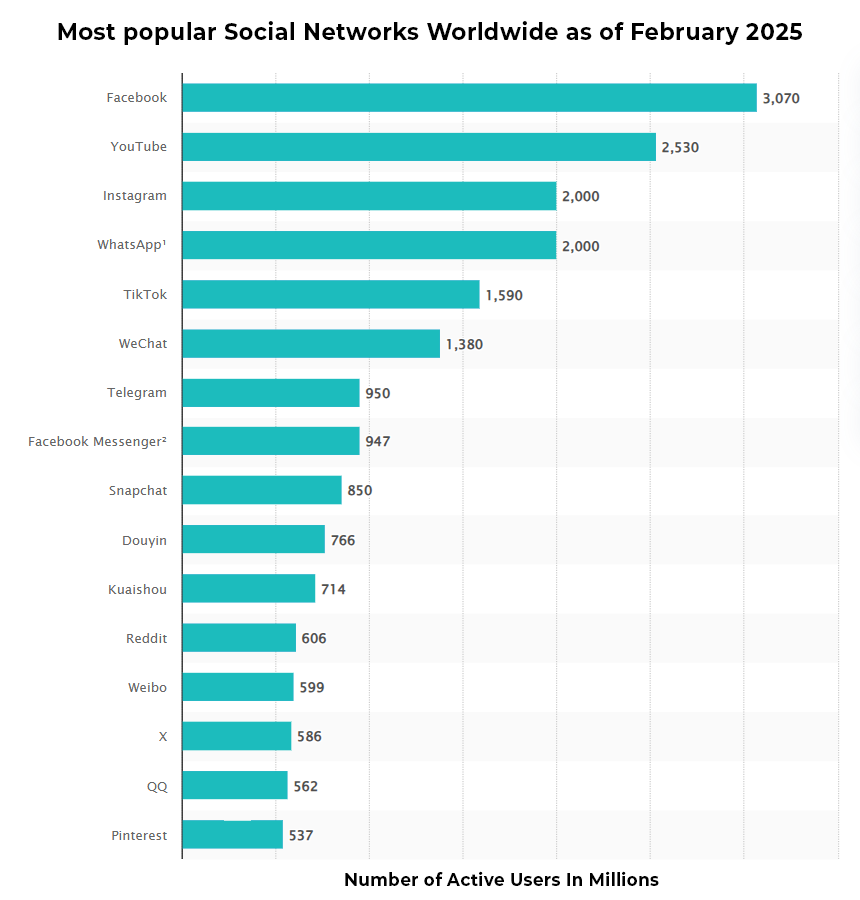
Facebook might have been the first global social media platform. While Myspace was popular in the early 2000s, its usage was still limited to younger demographics. Facebook has only grown since its inception, at least in its size as a company and its influence over people. And if you’re counting the total number of users, it’s still on top with 3.07 billion monthly active users (MAUs).
Popular social media graph

And while Facebook is still on top, YouTube isn’t far behind with 2.53 billion MAUs. Instagram and WhatsApp are tied with about 2 billion MAUs each. TikTok has also secured the fifth spot for most popular social media app at 1.59 billion MAUs.   

It may not be long before Facebook is dethroned as the most popular app. Its user base is growing older, and the only demographic that it is growing with is people over the age of 55. This isn’t ideal for Meta’s advertising hopes, and explains why they’re targeting younger demographics on Instagram.  

5. In the United States, Overall Growth Is Stagnant

While social media is predicted to grow as more people get access to smartphones, the market is saturated in the United States. Everyone can get online, and everyone can get a smartphone, computer, and several social media accounts in the process. 

If you look back over the last few years, there was a bit of growth in social media usage due to the pandemic, but previously, there was a dip. Thanks to a cultural shift, more users were becoming aware of the time they spent on social media, and people were disabling their accounts, sometimes deleting them. Many moved over to other social media outlets, while others chose to monitor their screentime.  

6. There Are Huge Demographic Differences in Platform Usage

Like many services, websites, and media outlets, different demographic groups tend to have niche preferences in social media platforms. Some might be a bit more universal (such as Facebook and X), but others are far more skewed. 

Women are far more likely to use Pinterest regularly, with only 30% of men using the platform regularly. Men are a bit more likely to use Reddit and LinkedIn. Interestingly, there are also large gaps depending on ethnicity and age as well, Older Americans are flocking overwhelmingly to Facebook and younger ones to TikTok, Instagram, and YouTube. For more data on the differences, we recommend you check out the full set of information from Pew Research. 

7. Social Media Is Vital to B2B Interactions and Sales

Social media might be a sizable industry, but it is hard to understate its effects on every online business. A strong page on sites is needed to run a business, and networking is often done online as opposed to over the phone or in person these days.  

And as one might expect, LinkedIn is king here, with B2B marketers saying that 80% of their social media leads come from the platform. About 46% of B2B marketers say Facebook is a key part of their plan.  

8. 2025 Social Media Ad Spending

It might not come as a surprise to anyone that social media advertising worldwide is expected to reach $276.72 billion in 2025. Believe it or not, that number is expected to keep growing, with an annual growth rate of 9.38% that will bring ad spending to $433.28 billion by 2030. A large share of this year’s ad spending will come out of China at $96.82 billion.  

It is also good to know that at this point the potential earnings from social media are even higher. While advertisements make up the lion’s share of the revenue for most social media outlets, other revenue streams such as premium subscriptions and additional products and services have been added.  

The economic impact of social media is so much more than just advertising as well. Personalities and companies showcase themselves, their skills, and their products organically on platforms. It is an economic driver, allowing for more “word-of-mouth” advertising that people trust the most. 

9. TikTok is Gaining Traction, Despite a Looming Ban

TikTok certainly has had an interesting story over the last few years. The short video app has taken the world (especially the young world) by storm and has launched an endless stream of memes and trends, for better and for worse. TikTok has been the torment of teachers, the endless entertainment of teens, and the birth of many a controversy.  

Most recently, the app faces an outright ban in the United States. Although the ban has been delayed twice by President Donald Trump, the app’s owner ByteDance has been ordered by lawmakers to sell their American share to a U.S.-based company or face going offline permanently. Chatter surrounds several investors, including a potential purchase from Amazon, but no bid has officially been accepted. As it stands, the latest deadline for a deal is June 18, 2025. 

Despite the potential shutdown, TikTok remains relatively popular among young Americans. Nearly 60% of users aged 18-29 report using the app. And there is still growth yet for the platform. Experts claim it’s one of the fastest growing platforms in the social media game, altering the course of media consumption to short-form video content.  

10. And Snapchat Is on the Decline

For whatever reason, while TikTok is growing popular among the younger demographic, Snapchat is not doing so well. The platform saw a 39.6% penetration rate in the U.S. last year, a decline from 40% in 2021. While this isn’t so huge a jump, consider that most successful platforms see an increase, not a decrease. This resulted in a brutal 88% stock drop in September 2024. 

Social media and major apps have fallen out of grace before (remember Tumblr?) and another bad step for Snapchat can relegate it to the history books or back pages of social media apps. 

Why might this be the case? It could be that other apps are effectively doing the same thing now, with WhatsApp providing some degree of privacy and other apps providing the short, ephemeral content style. And if someone only needs to use one app for everything, they will probably do so. And Snapchat is rarely people’s main social platform. 

Snapchat will likely be a mainstay of social media and communications apps for years to come, but its prominence as a relevant household name might not be so assured. It will need to reinvent itself to compete with the alternatives. 

On the Future of Social Media

The one thing that we can say with absolute certainty is that social media changes faster than practically any other industry. To stay competitive, companies need to create apps that utilize the latest tech, update their algorithms regularly, and meet their infrastructure needs, often in growing international markets. 

Sooner or later there will be another major social media giant to come onto the scene and shake things up. Maybe it’s out already and hasn’t hit critical mass yet. Much like how TikTok became popular quickly, something new will come in once there’s a gap. Facebook and Instagram aren’t going anywhere, but they may have company. 

It’s also obvious to say that social media is going to cause more controversy down the line. There’s a problem or a scandal every other week, along with more ongoing stories and threads than anyone but a professional journalist could keep up with. Whether this will lead to government sanctions or regulation on a company or the industry in general remains to be seen. It may also lead to stricter internal policies regarding personal data usage and tracking. 

Social media might become more local. As ads can become hyperlocalized and people are part of local communities, some social media networks might try to cater to those communities. Networks such as Nextdoor already exist, and it only stands to reason that we will find better ways to use them. 

Social media may come, in one way or another, to more of our devices. As our cars, televisions, and other devices become connected, it only stands to reason that social networks will integrate themselves better into those products. People may choose to ignore such features as they have in the past, but some will be successful and will make up a larger part of our lives. 

On the Future of Social Media

There is so much more to social media than what we see on our screens every day. Whether it is usage rates, revenue, or something else, there are statistics we can use to not only understand the present but have a better idea of where the industry is going. We hope that the above facts have helped give you a better idea of social media, and may you enjoy your digital circles with a better understanding moving forward. 
Are you on TikTok?  

If you’re under the age of 25, there’s a decent chance the answer is yes. But even if you’re not, the answer might also be yes. The Chinese social media app, also known as Douyin, that lets users create short, 60-second videos and alter them with all sorts of fun special effects, is rapidly taking over the social media scene. 

Just a few years ago, it was nothing more than a fun app popular amongst Chinese teens. Now, it is one of the most downloaded apps in the world, making the world’s social media giant — Facebook — look a little more closely in its rearview mirror.  

Want to know just how big this TikTok revolution is? Here are ten statistics you must know in 2025. 

1. TikTok Currently Has More Than 1 Billion Monthly Users

Although it only launched officially in 2016 and just came to the United States in 2018, TikTok has rapidly become one of the most popular social media websites and apps in the world.  

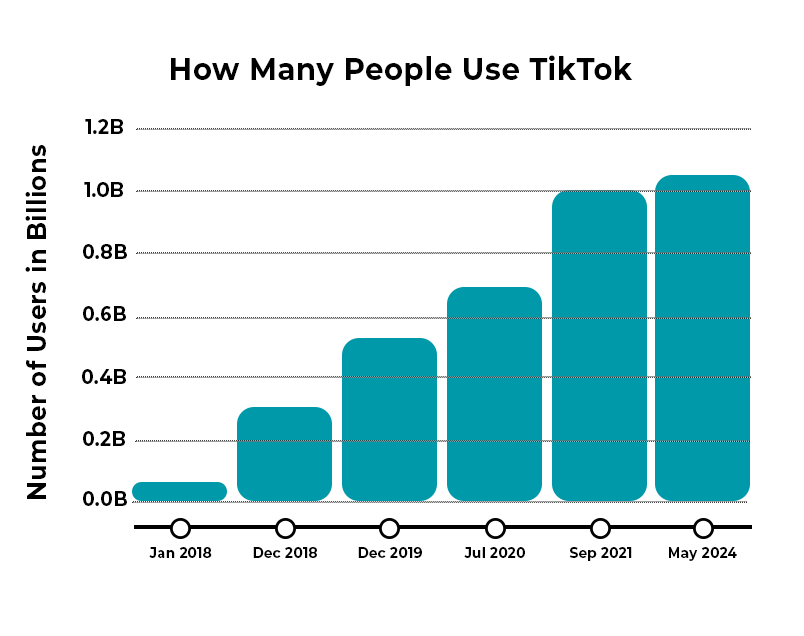
As of 2025, the app has 1.12 billion monthly active users (MAUs), which makes it one of the most popular social media platforms behind Facebook (3.065 billion MAUs), YouTube (2.5 billion MAUs), WhatsApp (2 billion MAUs), Instagram (2 billion MAUs), and WeChat (1.38 billion MAUs). 

To give you an idea of just how popular TikTok is, here is how quickly it has grown in the last few years: 

TikTok usage graph

One of the main reasons why TikTok grew so much in 2018 and 2019 was its acquisition of Music.ly, a U.S.-based social media service that already had around 80 million users before it was bought.  

After the purchase, TikTok migrated all of these accounts over to its own platform, and this helped launch a revolution in the United States and also made TikTok the first Chinese-based app to be majorly successful in the U.S. 

2. TikTok Continues to Search for a Buyer

Despite its success among Americans as the fourth most popular social media app in the country, TikTok is in a legal limbo. 

A ban against the app was set to go into effect in January 2025 after U.S. lawmakers deemed the app a threat to American data, privacy, and security. According to the law, TikTok’s parent company ByteDance must sell its U.S. operations to a U.S. company or risk going dark forever. The platform was down for roughly 12 hours in January after ByteDance failed to precure a buyer before the ban’s deadline. 

President Donald Trump has extended executive orders delaying the ban twice, most recently in April 2025, by 75 days. While a buyer has yet to be announced, the White House continues to advocate for a sale over an outright ban of the app.  

3. TikTok Users Around the World

TikTok is originally a Chinese app, and it still gets most of its traffic from the Asia-Pacific region. In fact, around 296.8 million of its users come from Asia-Pacific countries, and around one-quarter of the app’s total downloads come from the Middle East and Africa.  

In China, the app is referred to as Douyin. The name TikTok was created once the app decided to expand beyond Chinese borders. For the sake of consistency, it has kept this name in its original market.  

While it seems like more Americans are on the app than ever before, North America accounts for a small percentage of the platform’s total users at just 11.8%. 

4. The Average TikTok User Spends Nearly an Hour Per Day on the App

Anyone who has ever used TikTok before knows that it can be addicting. Its algorithm has the unique capacity to find videos relevant to you and your interests, and its format of playing video after video keeps you engaged. 

This translates to the average user spending around 58 minutes and 24 seconds per day on the app. Users are spend twice the amount of time they were on the app in 2019. The average user spends about 23 hours and 30 minutes on TikTok each month – almost a full day!  

5. TikTok is One of the Largest Online Shopping Platforms

What used to be known as “the dancing app” has evolved into one of the world’s largest marketplaces on social media. In 2019, TikTok slowly introduced in-app purchases, which allow users to buy coins and other virtual items that give them special access to content. By 2023, TikTok Shop was introduced to brands and sellers to generate income by uploading curated products for users to discover and buy.  

More than 1/3 of American users have purchased or sold an item through TikTok shop, and 68% are open to purchasing through the platform. Americans have spend close to $32 million a day shopping on TikTok. The majority of products sold are health and beauty related.  

Watching videos of the product itself has a compelled a significant amount of users to purchase; more than 60% of users have purchased directly through the platform after seeing an advertisement. Nearly half of TikTok shoppers purchase an item once a month, with a majority of users (nearly 75%) claiming to feel a deeper connection to the brands they interact with on TikTok.  

6. 16,000 TikTok Videos are Uploaded Each Minute

If you’ve ever wondered why some videos you upload rake in few views and others hit the viewing lottery, it probably has to do with the sheer volume of videos, not just the TikTok algorithm.  

Every minute, 16,000 videos are uploaded to the app. That means that, in any given hour, TikTok users upload a little less than a million videos.  

However, while these numbers might seem shocking (and kind of are), some context is needed. Each video on TikTok is only 30-60 seconds long, and with more than 1 billion users, it’s easy to see how the number of videos quickly balloons to astronomical numbers, further proof that TikTok very much is the next internet sensation. 

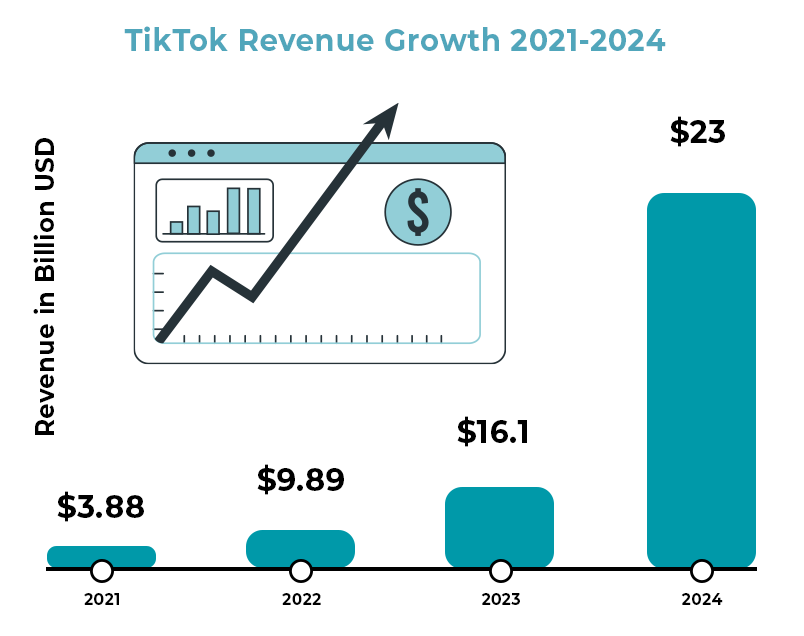
7. TikTok Revenue Hits $23 Billion in 2024

As one of the most popular and fastest-growing apps in the world, it comes as no surprise that TikTok is raking in the cash. Still technically a privately-owned company, exact figures are difficult to acquire, but reports claim the app generated about $23 billion revenue in 2024. About 77% of this revenue comes from advertising sales, a strategy used by pretty much every other social media app.    

This growth, however, is helping out more than just TikTok.  

Its parent company, ByteDance, made about $40 billion in 2024. However, there may be a change of hands soon as U.S. lawmakers ruled to ban the app unless it’s sold to a company in the U.S. or a country deemed friendly to the U.S. Though the deadline for a sale has been extended twice since the start of the year, pressure from the White House indicates a sale will happen sooner rather than later.  

8. Most TikTok Users Are Under 34

If you find yourself asking, “What’s a TikTok?” don’t be surprised if younger people laugh at you and call you a boomer. But also don’t feel bad. TikTok is very much a GenZ app. Around 1 in 4 TikTok users are under 20 years old. 

Another 35% are between 25-34, and then 19% are between 35 and 44.  People over the age of 45 account for around 27% of all TikTok users.  

Still, TikTok is very much a young person’s app, and this is part of the reason why it has become so popular in the U.S. Many people from younger generations don’t like Facebook or see it as an app that their parents use. Plus, TikTok is geared towards shorter, quirkier, and more creative videos, which appears to be what the younger generations want more. 

9. TikTok Produces High Engagement Rates

Another reason why TikTok is becoming more and more popular is that engagement on the app is much higher than it is with other social media apps. For those who don’t know, engagement refers to when someone likes or shares a post, or when they follow your account after seeing some of your content.  

TikTok engagement has seen a dip from previous years but clocks in at an average of 2.5% by follower count. Instagram is close behind with an average engagement rate by follower count at just 0.50%.  

10. The Most Followed TikTok Account has More than 160 Million Followers

One thing TikTok is doing more so than any other social media app (except perhaps YouTube) is turning people into stars. Because of its popularity, and also because of how easy it is to produce content, regular people are quickly becoming superstars on the platform.  

As of April 1, 2025, the most popular account on TikTok belongs to Khabane Lame with more than 162 million followers. His account is followed by Charli D’Amelio and MrBeast. How long this fame lasts remains to be seen; one aspect of TikTok is that people regularly fall in and out of popularity.  

However, given how successful some people have been with the app, it’s likely to encourage more and more individuals to download it and try and find their moment in the spotlight, something that can only improve TikTok’s popularity. 

The Next Facebook?

Based on these numbers, it’s clear that TikTok is here to stay. This isn’t just some fad that will die out in a few months. Instead, this app is a legitimate player in the world of social media and just might make a run at the top spots currently held by one of Meta’s four companies. But this is also far from a guarantee. Facebook has been at it for much longer, and TikTok does face the challenge of being based in another country. But if the internet world has taught us anything, it’s that things can change on a dime. It’s a roller coaster and all we can do is hang on tight. 

If you’re reading this, you probably have some sort of problem with your internet connection. And with that, we deeply sympathize with your plight. It can be absolutely disruptive to a day, harm your work, and even be hazardous to your safety in some circumstances. The internet is a lifeline for many, especially after the pandemic showed us how much we have to rely on it at times.

And the internet can be tricky to work with. It feels like it’s working one moment and is cut out the next, and it’s tough to find clues about how the internet is not working when it is working (if temporarily). On top of that, your connection is based on several different parts and factors, many of which are outside of your direct control.

While fixing up your internet is a complex issue, we hope that you’ll be able to get more information from the following information. Go through the steps and see what you can do, before you pull your hair out with frustration.

Restart Your Equipment and Computer

Sometimes just resetting your computer, router, and related equipment solves the issue. It isn’t the most scientific approach to solving the problem, but it often works for one reason or another, and it is quick to try out (five minutes or less).

To reset your modem and router (or likely a combo), first, check the LED status light. Look for the internet signal light to be on, as well as a WiFi light if applicable. There might be several WiFi lights for the different bands of internet your modem uses. The lights should generally be flickering. If they are off or red, then something is wrong with that piece of equipment, and you should keep that in mind for later if resetting doesn’t work.

There may be a button on your modem and router to make it restart or reconnect, but in general, the way to restart your internet equipment is to unplug it. Wait ten seconds after doing so, and then plug it back in. It may take a few minutes to completely reboot, so don’t panic if your internet doesn’t turn on immediately.

Did this fix your internet issues? If so, that’s great! Keep an eye on things and make note of when you had to do a restart. If not, then you need to move onto the other possibilities.

You may also want to reset your computer and other related equipment. Sometimes it might have an issue accepting the signal, or your computer’s WiFi receiver may need a reboot. It’s necessary every once in a while anyway, so it cannot hurt in most cases.

Note that we only recommend restarting everything as a solution if it permanently solves the problem. If it only solves the problem for a short period of time, then you aren’t really fixing the problem and you should move onto the other steps. If you’re ISP thinks they’re solving the problem by telling you to reset things and then you keep having problems after the call is done, you need to press the issue on this point.

Diagnosing the Problem

So as was predictable if you’re reading this, restarting your equipment didn’t solve the problem. This means you must investigate the matter more, which we know is a chore. However, we are here to help you diagnose the problem, so note all the following:

One thing you will want to pay attention to is whether the disconnections, interruptions, or slowdowns occur at certain times of the day.

Try to see if you can localize the problem and notice if it is happening more on one device or in a certain area of the house. This can help better identify the problem if it is a hardware issue of one sort or another.

If you can (perhaps using a data plan), check online to see if there are reports of outages in your area. Perhaps a line was knocked down or there is a malfunction in a nearby area. If so, the problem will be resolved in time.

What type of problem do you have? Do you need to reset the router frequently? Do you regularly have issues staying connected to something that needs a constant connection (getting booted from a game just for you to reconnect in a few seconds is frustrating)? Do you get the feeling that your equipment is just not enough for the connection you are paying for? To fix the problem, you need to ask the right questions first.

Speed Tests

One thing you can do is perform a speed test. You’ll get information on whether there is a connection, how fast your connection is versus the advertised speed (more on that later), and  

There are several great speed test sites online, and for these purposes, any of the major ones will do. Make sure they have a server in your area and have minimal extra fluff on their main page that will interfere with the results. 

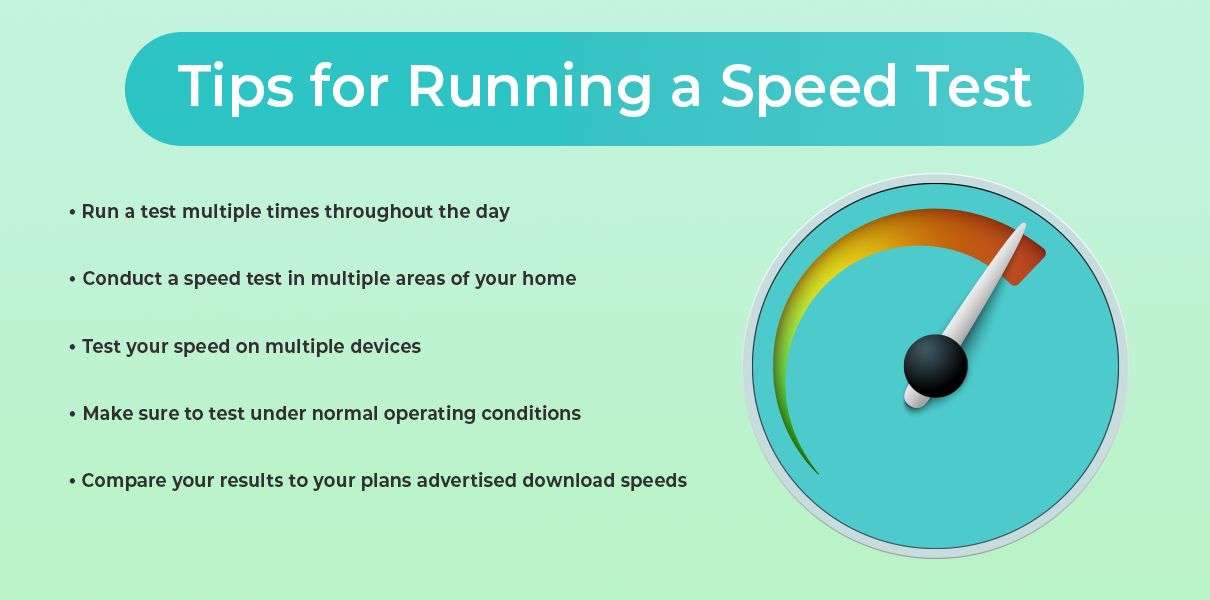
To run the best speed test possible, make sure you do the following: 

tips for running speed test
  • Try to perform a speed test at multiple times of the day. This way you can tell if there are slow hours. 
  • Try to perform a speed test from multiple areas around your house where you would use the internet. If there is interference, it might only show up in one place. 
  • Perform a speed test with multiple devices. Your smartphone and your computer will work just fine, especially if done from the same general location. This can rule out whether the problem is with your device instead of the entire internet infrastructure. 
  • Do it under normal operating conditions, meaning that you shouldn’t be doing any heavy online work or doing any major downloads while you are performing the test. It could interfere with the readings. 
  • Compare your download and upload speeds versus the advertised speeds of your ISP, especially if you are using an ethernet cable (WiFi users can experience some dropoff). Advertised speeds are usually mentioned as “up to X Mbps” but you should be getting at least 80 percent of your download speeds at most times. If you are consistently not, you should be investigating why or looking for another Internet provider. 

In general, what helps is taking as many notes as possible. You might not want to get too detailed with it as after a certain point it’s the ISP’s job to diagnose the problem, but knowing the potential sources makes everyone’s lives a lot easier. 

Using the Tools You Have

Use the tools that exist on your computer and possibly in your modem and router. Automatic troubleshooting has come a long way since the days of early dial-up. If you have a more advanced modem-router combo, you might have an app associated with your internet service or equipment. That app will be able to tell you quite a bit about your connection, including if there have been any problems lately. Results may vary, but it is likely a quicker diagnosis than relying on the ISP for help or trying to piece the problem out yourself. 

Now might be a great time to check to see what is available on your system and whether you think it will be of any help. 

When Your WiFi Is the Problem

If you ruled out your ISP or note quickly that there is something off with your equipment, then your WiFi is the problem. If an ethernet cable fixes everything but your smartphone connection doesn’t work through most of the house, then your WiFi is the problem. 

Your home may not be conducive to your current WiFi setup. There might be too many walls blocking the way, or some materials might be blocking the signal in ways you wouldn’t find in other homes. You probably shouldn’t remodel your home to get a better internet signal (but don’t let us stop you).  

What you can do is perhaps rearrange your setup to put your modem and router in a more central location. If your home is too big for your router’s current range, you can either upgrade your router or you can add additional nodes or a WiFi extender. They are not terribly expensive, and you can tune your setup and add extra extenders as needed to get maximum coverage. They do have their limits and they won’t be as good as a direct connection, but if you have something strong to start with you can easily work with them. 

However, sometimes you just need to replace your router or your modem/router combo to fix your connection. If you are provided one or rent one through your ISP, you’ll need to bring it up with them. You might be due for an upgrade. If you got it yourself, you can get another one for yourself and make the upgrade, ideally with some improvements to performance in the process so it’ll last you the next few years.  

Switching WiFi Bands

Most routers work over two different bands: 2.4GHz and 5GHz. The 5 GHz is faster but typically has less range, while the reverse is true for 2.4 GHz. When both work, some routers will use both bands to create the fastest possible speeds. There are also now even faster 6GHz bands, but they are not so commonly used yet (look out for them in the next few years). 

However, to get a better connection on your end, you might want to connect to one band or another from your device or change the settings on your router. If you are close to your router, try out the 5GHz band if you aren’t already connected. Far away on the other side of your house? Then try out the 2.4GHz band. However, this will not solve permanent problems, and you won’t be getting the most out of your router this way. We do not recommend you do this, although it can work in a short-term pinch or when you are far away from your router. 

Resetting Your Setup

Sometimes you don’t know what went wrong or what wrong button you pressed, but you want your internet back and you don’t want to worry about it anymore. In such cases, you might want to take the “admittedly extreme” option of resetting your network settings. 

To do so on your Mac computer, follow these instructions. 

To do so on your Windows computer, follow these instructions instead. 

Note that this can be a bit of a pain given that you are starting from scratch, but if there was a setting or bug that was causing your internet problems, this should fix it. Plan for some time to set up networks, network names, passwords, etc. again. 

Resetting Your Equipment

There is also the option to just restore your router and modem back to their factory settings, in case there were some options that were changed for the worse and you’re not sure what might work best. 

To do so, look for a tiny pin size hole in your equipment. You want to press a button that is on the inside of that hole. There might be something that came with the router to do so, but if you lost this (many of us do), then a pin or a toothpick will likely do the trick. If you do not see such a hole or are nervous about doing so, consult the manual that came with the router and/or modem. If these are long gone, then a search online should yield the manual you need, so long as you know the model of your equipment.  

Note that getting everything back to normal on top of this can take some time as well, and as such, you may need to wait. Schedule some time to read a book or clean the house while the equipment is sorting itself out. 

Is It Malware?

Cybersecurity is becoming ever more important to keep your information and your connection safe, and you might see your connection suffer if you’ve been neglecting it (or even if you haven’t). Malware can slow down your connection and your computer through its own ends (perhaps using your device as part of a botnet, etc.), and it can cause other issues. An unstable internet connection is bad. Identity theft is much worse. 

While there are plenty of cybersecurity protocols and habits you should be following, here are the ones most relevant to your internet connection:  

Regularly do a scan of your computers (and perhaps your smartphone) for viruses, malware, and the like. You should do so at least once a week, and whenever you feel there might be something interfering with your  

While there are debates as to whether a premium antivirus software is necessary or not, you should have some form of protection and should note that many of the free options (though not all) are not secure enough for your needs. Do your research here. 

Be careful of what you download and invite onto your device. There is little your protection software can do if you are opening the front door for threats. Don’t download files from unknown sources, and take advantage of opportunities to scan attachments in advance of opening an email or file. 

Is it Your Antivirus?

Ironically enough, many people have reported having trouble with certain downloads or their connections in general with their Antivirus program. While this is a risky move long-term, turning off your firewall might alleviate the problem, allowing you to better understand the cause. It could be a particular setting or one site you are trying to use sets off the alarms, despite you knowing it is perfectly safe (do make sure that it is perfectly safe). 

If your internet is entirely down, especially across the house, then this is almost certainly not the cause. But take this as a chance to review your settings and the program that you are using. 

Issues with Your IP Address

It is somewhat uncommon compared to the other issues, but your computer might be having issues configuring an IP address. You need an IP address, but for some reason there might be multiple of your devices using the same address, leading to conflicts. If you have more than one router on the same network (not a mesh network or a router and extenders, mind you), then this issue can pop up. 

We recommend checking to see if you have a valid IP address quickly to see if that’s the issue. 

Advanced Troubleshooting

If you’ve already gone through the basics and still have persistent internet issues, it’s time to dig a little deeper. These advanced troubleshooting techniques can help uncover more complex or less obvious problems—and give you a better chance at solving them without waiting endlessly on hold with your ISP. 

Check Device Logs and Router Log

1. Check Device Logs and Router Logs 
Most modern routers have a logging feature that tracks connection history, dropped packets, and internal errors. You may need to log in to your router through a web browser (usually something like 192.168.1.1 or 192.168.0.1) and dig through the settings to find system logs. These can help pinpoint if the problem is with your internet signal or your internal network. Look for repeated errors or disconnects at specific times. 

2. Run a Continuous Ping Test 
If your connection drops briefly or you notice lag, open a Command Prompt (Windows) or Terminal (Mac) and type: ping google.com -t (Windows) or ping google.com (Mac).  

Let it run for several minutes. If you see timeouts or massive spikes in response time, you likely have packet loss or high jitter—common signs of a weak connection or interference. 

You can also try ping your_router_ip (usually 192.168.1.1) to see if the problem is internal or external.  

3. Use Traceroute to Pinpoint the Problem 
Traceroute helps you find where your connection slows down or fails by mapping the path your data takes to reach a website. In the Command Prompt or Terminal, type: 
tracert google.com (Windows) or traceroute google.com (Mac/Linux).  

If there’s a big delay or failure at a specific hop, the issue could be with your ISP or somewhere along the broader network. 

4. Check for Bandwidth Hogs 
One rogue device or app can tank the entire network. Log in to your router and check the list of connected devices. See if any are using a large amount of bandwidth—especially unexpected ones like smart TVs, cloud backup tools, or unknown devices (which could be someone piggybacking on your network). 

5. Look for Firmware or Driver Issues 
Outdated firmware on your router or drivers on your devices can cause all sorts of strange problems. Check for firmware updates on your router’s admin page, and update your network adapter drivers through your device settings or manufacturer’s site. 

6. Test with a Static IP Address 
Sometimes DHCP issues (where devices are dynamically assigned an IP address) can cause instability. Assigning your device a static IP can bypass that. It’s a more advanced move, so look up your router’s configuration guide if you’re unsure. 

7. Interference from Nearby Networks 
In crowded areas, too many WiFi networks using the same channel can cause serious interference. Use a free WiFi analyzer app to scan for nearby networks and change your WiFi channel accordingly in your router’s settings. For 2.4 GHz, channels 1, 6, and 11 are typically best. 

8. Use Quality of Service (QoS) Settings 
If video calls or gaming are constantly getting interrupted by other devices downloading or streaming, set up QoS rules in your router. This prioritizes important traffic so that one user’s movie night doesn’t ruin another user’s Zoom meeting. 

General Ways to Improve Your Connection

Not having major issues, but still wanting an improved connection for streaming, gaming, or video calls? Try out the following if you want to make some improvements: 

  • Check the location of your router. Could anything be blocking it off, if only temporarily? Ideally, your router should be close to your device (just not too close), not be surrounded by other objects, and not be blocked off by too many walls and ceilings. If placement is an issue, you might want to invest in a different setup or get a range extender. A mesh setup can also work if you’re willing to invest more, but that’s only needed for very large homes or smart homes. 
  • No matter how you set up your router, a direct ethernet connection is going to be your best option for the fastest, most consistent connection. Nothing beats a direct line. 
  • Note that if you haven’t changed your ethernet cable in some time, then perhaps a simple cord is the cause of your internet issues. Change it out and see if things improve. 
  • Check to see if there are a bunch of background programs using up your bandwidth. While some apps mean well regularly updating, they can do so at inopportune times. 
  • While unlikely, make sure that your network is private and has a good password. You don’t want your neighbors to be leeching off of your connection unless you have a previous agreement. 
  • You may want to change your password for your WiFi if you haven’t done so in a long time. A little caution cannot hurt. 

Upgrade Your Internet Service

Perhaps your internet works perfectly fine for the service you paid for, but that just isn’t enough anymore. Apps and programs often require more bandwidth than ever before, and the 4k content on streaming services today requires a strong connection. What worked ten or even five years ago might not work now, and will not work as time goes on. 

There are certainly more advanced guides to finding a better internet service, and our guides can help you make a decision on who to go with. Just take your time with it, know how much speed you need (erring on the side of much faster to prepare for the future), and don’t be afraid to switch providers. Many ISPs will buy out old agreements to get a new customer. 

Conclusion

There are few things more frustrating than internet problems, especially when you feel as though you don’t have any control over the problem. But often you do have some measure of control, and we hope that you feel empowered to take control of your connection and fix what you need to. If things aren’t going well, take action and either adjust your setup or contact your provider. You deserve to have the best connection available, and we hope that you manage to solve your problems as soon as possible. 

If you’ve just run a speed test and are staring at the numbers on your screen wondering what they actually mean for your daily browsing, you aren’t alone. We understand that seeing a number that doesn’t match your expectations—or your monthly bill—can be frustrating. 

Internet speed test results can be confusing because they represent a snapshot of your connection’s maximum capacity at a specific moment, not necessarily the consistent speed you experience while watching Netflix or hopping on a Zoom call. To truly understand your internet performance, you need to look beyond the raw numbers and understand the relationship between bandwidth, speed, and congestion. 

What Is Internet Bandwidth?

When we talk about internet bandwidth, we are referring to the maximum amount of data that can be transferred over your network connection in a given amount of time. It is essentially the capacity of your connection. 

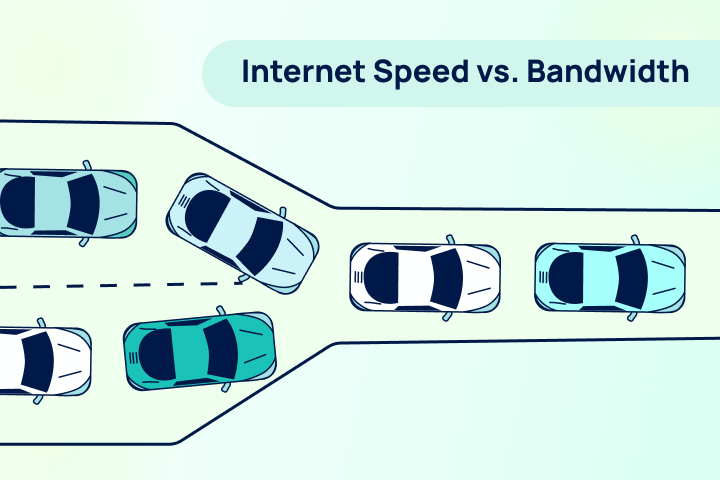
Think of bandwidth like a highway. The bandwidth is the number of lanes on that highway. A wider highway (higher bandwidth) allows more cars (data) to travel side-by-side simultaneously. This capacity is crucial for modern households where remote work, streaming 4K video, and online gaming happen all at once. 

If you have a narrow highway (low bandwidth) and try to push too much traffic through it, everything slows down. That’s why having sufficient bandwidth is critical for Zoom meetings and ensuring your video streaming doesn’t buffer constantly. 

Bandwidth vs. Internet Speed: What’s the Difference?

While they are often used interchangeably, the concepts of internet bandwidth vs speed are distinct. 

  • Bandwidth answers the question “How much?” It is the total capacity of the pipe. 
  • Speed answers the question “How fast?” It is the rate at which data moves through that pipe. 

To go back to our highway analogy: Bandwidth is the number of lanes, while internet speed is the speed limit (or how fast the cars are actually driving). 

It is important to understand the difference between download vs. upload speeds within this context. Most residential internet connection types—like cable or DSL—offer asymmetrical bandwidth, meaning you have a wide highway for downloading data but a narrow lane for uploading it. Gigabit internet via fiber, however, often provides symmetrical bandwidth, giving you maximum capacity in both directions. 

Now You Know What Bandwidth You Need.

Find out who can deliver it where you live.

Now that you know what bandwidth you need, find out who can deliver it where you live.

How to Understand Your Internet Speed Test Results

When you look at your results on TestMySpeed, you are seeing a real-time measurement of how your bandwidth and speed are performing together. Understanding internet speed metrics is the first step toward fixing a slow connection. 

Here is a breakdown of what you are looking at: 

  • Download Speed: How quickly your network can pull data from a server (loading a webpage, streaming a video). 
  • Upload Speed: How quickly you can send data (posting to social media, your video feed on a conference call). 
  • Latency (Ping): It’s the time it takes for a signal to travel from your device to the server and back. High latency causes lag, even if your speed numbers look high. 

If your results are lower than expected, check if your ISP is throttling your internet or if you aren’t getting the speed you’re paying for. 

Internet Speed Result Tiers: What Different Speeds Mean

Not sure if your result is “good”? Here is a quick guide to what different speed tiers typically handle.  

Find how much Internet Speed do you need

Your household may want faster internet speeds.

<50 Mbps

Great for individuals to browse the internet, check email, and other basic browsing.

50-100 Mbps

Great for streaming Netflix, videos, and online meetings.

100-200 Mbps

Great for streaming high quality videos, fast downloads, video games, and multiple devices.

200+ Mbps

Great for doing almost anything at ultra fast speeds.

How Bandwidth Affects Real-World Internet Speed

It is vital to remember that the bandwidth vs speed dynamic is affected by your environment. Bandwidth is a maximum limit, not a guarantee. 

Several factors can reduce your actual speeds below your bandwidth cap: 

  • Network Congestion: Just like rush hour traffic, internet traffic affects speed. If everyone in your neighborhood is online at 7 PM, your cable connection might slow down. 
  • Hardware: An old router or modem acts like a bottleneck, limiting the bandwidth that actually reaches your device. 
  • Connection Type: As explained in our guide to internet connection types, fiber is generally more consistent than DSL or satellite. 

How Multiple Devices & Concurrent Connections Impact Speed

The most common reason for “slow” internet isn’t always the provider—it’s the number of concurrent connections. 

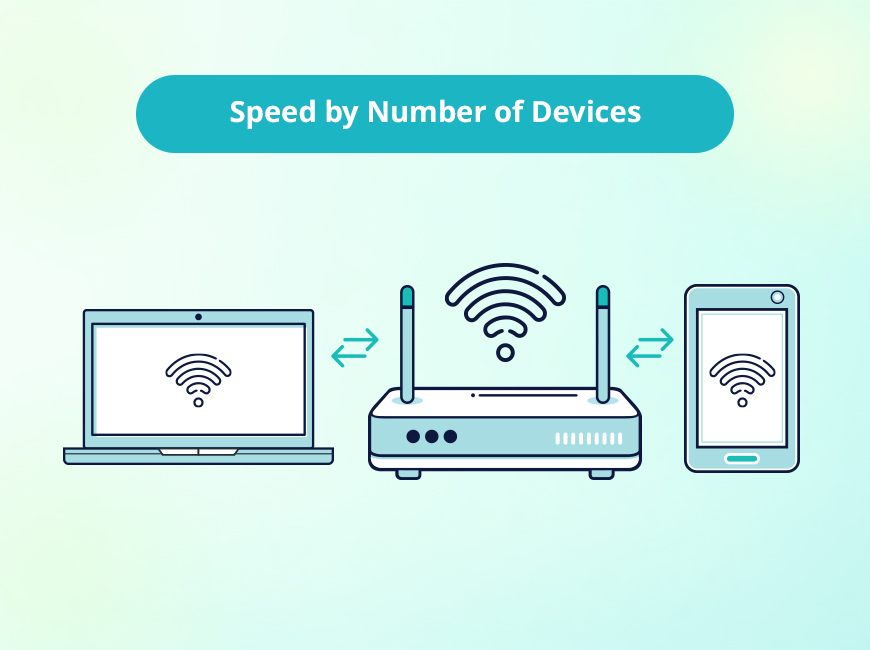
Every device connected to your Wi-Fi takes up a lane on that bandwidth highway. If you are working remotely while the kids are gaming and the TV is streaming 4K, you are splitting your total bandwidth three ways. 

This division often results in high latency and buffering, because your capacity is maxed out. Even a fast connection can crawl if it’s overloaded. Understanding streaming data usage can help you manage these bottlenecks better. 

Managing Bandwidth for Better Performance 

If your internet speed test results are consistently low, optimization might help before you commit to paying for a pricier plan. 

  • Prioritize Traffic: Many modern routers allow you to prioritize bandwidth for specific devices (like your work laptop) using Quality of Service (QoS) settings. 
  • Upgrade Hardware: Ensure your router can handle the gigabit speeds if you are paying for them. 
  • Identify Slowdowns: Read up on the 15 reasons for slow internet to troubleshoot hidden issues like interference or background updates. 

FAQs: Understanding Internet Speed Test

FAQs: Understanding Internet Speed Test 

Why is my speed test slower than my internet plan?
Speed tests measure real-time performance, which is affected by Wi-Fi interference, network congestion, and the capabilities of the device you are testing on. Wired connections usually yield results closer to your plan’s advertised speed.

Is bandwidth the same as internet speed? 
No. Bandwidth is the total capacity (how much data can be moved), while speed is the rate of transfer (how fast the data moves). You need both for a smooth online experience. 

How many Mbps do I really need? 
For basic browsing, 25 Mbps is sufficient. For 4K streaming and remote work, aim for at least 100 Mbps. Households with 4+ heavy users should look for 200 Mbps or higher. 

Why does my internet slow down at certain times of day? 
This is likely due to network congestion, often called “peak hours” (usually evenings), when many people in your neighborhood are online simultaneously. 

Speed Test Are Only the Beginning

Your TestMySpeed results are a diagnostic tool—a way to peek under the hood of your connection. By understanding the balance between internet bandwidth and speed, you can decide whether you simply need to kick a few devices off the Wi-Fi or if it’s time to call your provider for an upgrade. 

Recommended Reading: 

Mobile Gaming & Internet Speed

In the dynamic world of mobile gaming, having a stable, fast connection from reliable internet providers is essential. The internet speed provided by your ISP matters significantly, whether you’re a casual or hardcore gamer. Let’s explore popular genres and their connectivity needs to determine your ideal mobile gaming speed with the right internet providers.

Casual Games: Light & Easy

Casual games encompass a wide range of low-intensity titles on mobile devices, from brain teasers like Sudoku to hyper-casual tapper games. With minimal real-time interactions and low data usage, casual games have relatively modest internet speed requirements.

A basic 3-8 Mbps connection should provide a smooth gaming experience without disruption. You can enjoy lag-free gaming sessions without needing the highest internet speeds. Top Casual Games include:

  • Cosmic Rewards: Casual games with play-to-earn rewards like gift cards to Amazon and Target.
  • Words with Friends 2: Chat and expand your vocabulary with word game matches

Life in the cloud requires fast internet

default graphic

Online Multiplayer Games: Real-Time Challenges

Online multiplayer games bring players together for intense real-time collaboration and combat. Here, fast reflexes and split-second decision-making are essential – any delay due to lag can mean losing.

To enable seamless competitive gameplay, aim for download speeds of at least 20-25 Mbps. A low-latency connection is also equally crucial for lag-free gaming. Top Multiplayer Games include:

  • Call of Duty Mobile: FPS action and varied multiplayer modes
  • Clash Royale: Real-time card battles against online opponents

Cloud Gaming: The Future of Mobile Play

Cloud gaming has emerged as an exciting development, allowing gamers to stream gameplay directly from remote servers. With your commands and inputs being instantly transmitted online, cloud gaming demands higher bandwidths for smooth data transfer and minimal latency.

For the optimal cloud gaming experience, target download speeds of 25-50 Mbps at a minimum. Fast cloud gaming requires consistently high internet speeds – especially with immersive titles consuming up to 10GB per hour. Top Cloud Gaming Services include:

  • Xbox Cloud Gaming: Stream Xbox console games directly to your phone
  • Amazon Luna: Cloud game streaming for Prime members
Factors Impacting Mobile Internet Speed

Factors Impacting Mobile Internet Speed

Several factors can affect your mobile internet speed, and being aware of them can help you optimize your gaming experience.

  • Network Congestion: High network traffic during peak hours or in densely populated areas can cause slow internet speeds.
  • Physical Obstructions: Thick walls, large buildings, and natural barriers can weaken your Wi-Fi signal or interfere with cellular reception.
  • Data Plan Limitations: Many mobile data plans come with data caps or fair usage policies. After reaching your monthly data allowance, your internet speed may be throttled.
  • Signal Strength: The strength of your cellular signal or Wi-Fi connection directly affects your internet speed.
  • Device Performance: The capabilities of your mobile device play a role in internet speed.

Find how much Internet Speed do you need

Your household may want faster internet speeds.

<50 Mbps

Great for individuals to browse the internet, check email, and other basic browsing.

50-100 Mbps

Great for streaming Netflix, videos, and online meetings.

100-200 Mbps

Great for streaming high quality videos, fast downloads, video games, and multiple devices.

200+ Mbps

Great for doing almost anything at ultra fast speeds.

Optimizing Mobile Gaming Speed & Performance

Factors like network congestion, poor signal strength, and device performance can hamper your mobile speeds and disrupt gameplay. Consider these tips:

  • Consider gaming during off-peak hours or switching to a less congested network if possible to enjoy smoother gameplay.
  • To enhance your connection, position yourself closer to the router, or use Wi-Fi extenders for better coverage.
  • Upgrading to a more generous data plan or a wireless internet plan can prevent disruptions during your gaming sessions.
  • If you experience slow speeds or frequent disconnections, check your device’s signal indicator and switch to a network with a stronger signal if possible.
  • Consider upgrading to a device with better performance. If you’re a casual gamer, optimizing your current device may improve your gaming experience.

Choose the Right Mobile Internet Speed for Gaming

Choosing the right mobile internet speed is essential for a smooth and enjoyable gaming experience. Consider your gaming habits, research speed requirements for your favorite apps and titles, and select a high speed internet plan that aligns. With matching connectivity, you can optimize performance, reduce lag and buffers, and immerse yourself in mobile play anytime, anywhere.

Gigabit internet is a type of high-speed internet service that provides speeds of up to 1,000 Megabits per second (Mbps). This is substantially faster than typical home broadband internet speeds, which range from 10 Mbps to 500 Mbps.

Gigabit internet is an excellent option for households that frequently use data-intensive applications such as streaming apps, and downloading large files, and especially for those who require high-quality internet speeds for gaming. This type of internet connection offers impressive download and upload speeds, which are necessary to support multiple devices being used simultaneously. 

Here are some of the benefits of gigabit internet:

Faster Streaming

Gigabit internet can handle multiple high-definition (HD) or 4K streams concurrently. There’s no need to worry about buffering or degraded quality, even with multiple streams in a household.

Reduced lag

Faster internet can reduce lag (internet latency), improve download times for games and updates, and enhance the overall multiplayer experience.

Smoother video conferencing

For households where multiple members are working from home, gigabit internet can handle several video conference calls simultaneously without a hitch.

Quicker file transfers

If your work involves frequently downloading or uploading large files, gigabit internet significantly reduces the time you spend waiting.

Support for smart homes

For households with many smart devices (such as security cameras, smart speakers, etc.), gigabit internet can accommodate these devices’ data demands without slowing down.

Find how much Internet Speed do you need

Your household may want faster internet speeds.

<50 Mbps

Great for individuals to browse the internet, check email, and other basic browsing.

50-100 Mbps

Great for streaming Netflix, videos, and online meetings.

100-200 Mbps

Great for streaming high quality videos, fast downloads, video games, and multiple devices.

200+ Mbps

Great for doing almost anything at ultra fast speeds.

Gigabit Internet Cost

Gigabit internet can be more expensive than traditional broadband internet. The cost of gigabit internet varies depending on the provider and the location. Typical gigabit internet costs are between $60 – $100 per month. However, there are some providers that offer gigabit internet for less than $60 per month.

  • Xfinity gigabit internet: $70/mo.
  • AT&T gigabit internet: $95/mo.
  • Spectrum gigabit internet: $99/mo.

Gigabit for Businesses

Gigabit internet can be a valuable asset for businesses that need to transfer large amounts of data or support numerous employees. The fast speed of gigabit internet improves employee productivity and efficiency, along with quick access to valuable cloud-based computing systems frequently used by modern businesses. Beyond its employees, gigabit internet is an ideal high-capacity internet solution for companies that offer public WiFi to its guest, clients, and customers.

If you’re looking for a high-speed internet service that can handle your household’s needs, gigabit internet is a great option. However, it’s important to note that gigabit internet is not available in all areas and can be expensive. If you’re not sure if gigabit internet is available in your area, you can contact your internet service provider to inquire about their gigabit internet plans.