Let’s face it; we all know that internet costs are rising, but for many customers, connection speeds aren’t keeping up. That means you’re likely paying a premium price for a high-speed plan, yet you still find yourself staring at a buffering wheel during your favorite show or freezing during a crucial Zoom call. In 2025, with more devices connected than ever before, like smart fridges to VR headsets, a consistent connection isn’t just a luxury; it’s a necessity. 

The only way to know for sure if you’re getting what you pay for is to test, compare, and track your internet performance. Don’t let your ISP (Internet Service Provider) off the hook. 

Check out your current speed by running a free internet speed test.  

Key Takeaways

  • Establish a Baseline: Regular speed tests reveal when your connection is underperforming compared to your “normal.” 
  • Test Everywhere: Testing in multiple rooms helps diagnose if the issue is your Wi-Fi router or the ISP connection coming into your home. 
  • Compare to Your Plan: Check if your actual speeds match the “up to” speeds promised on your bill. 
  • Keep a Log: A history of poor results is your best weapon when negotiating with your ISP. 
  • Try Simple Fixes: Sometimes, moving a router or updating firmware can fix speeds without costing a dime. 

What You’re Actually Paying For (and Why Real Speeds Don’t Always Match)

When you signed up for your internet plan, you probably saw a big number like “1 Gig” or “500 Mbps.” But there’s a catch: ISPs almost always advertise “up to” speeds. This means that under perfect, laboratory conditions, that’s the speed you could get. Real-world conditions are rarely perfect. 

Factors That Impact Actual Speeds

  • Wi-Fi Interference: Walls, microwaves, and even your neighbor’s Wi-Fi can interfere with your signal. 
  • Outdated Hardware: An old router can’t handle the speeds of modern fiber connections. 

Quick Definitions 

  • Download Speed: How fast you pull data from the internet (loading web pages, streaming Netflix).  
  • Upload Speed: How fast you send data to the internet (posting to Instagram, your video feed on Zoom). 
  • Latency (Ping): The reaction time of your connection. High latency causes lag in gaming. 
  • Jitter: The variation in latency over time. High jitter causes choppy voice and video calls. 
Term What it Affects Good Range 
Download Speed Streaming, browsing 100+ Mbps 
Upload Speed Video calls, gaming 10-20+ Mbps 
Latency Gaming response time < 50 ms 
Jitter Call smoothness < 30 ms 

Step 1: Establish Your Baseline Internet Performance

Test Your Speed Correctly 

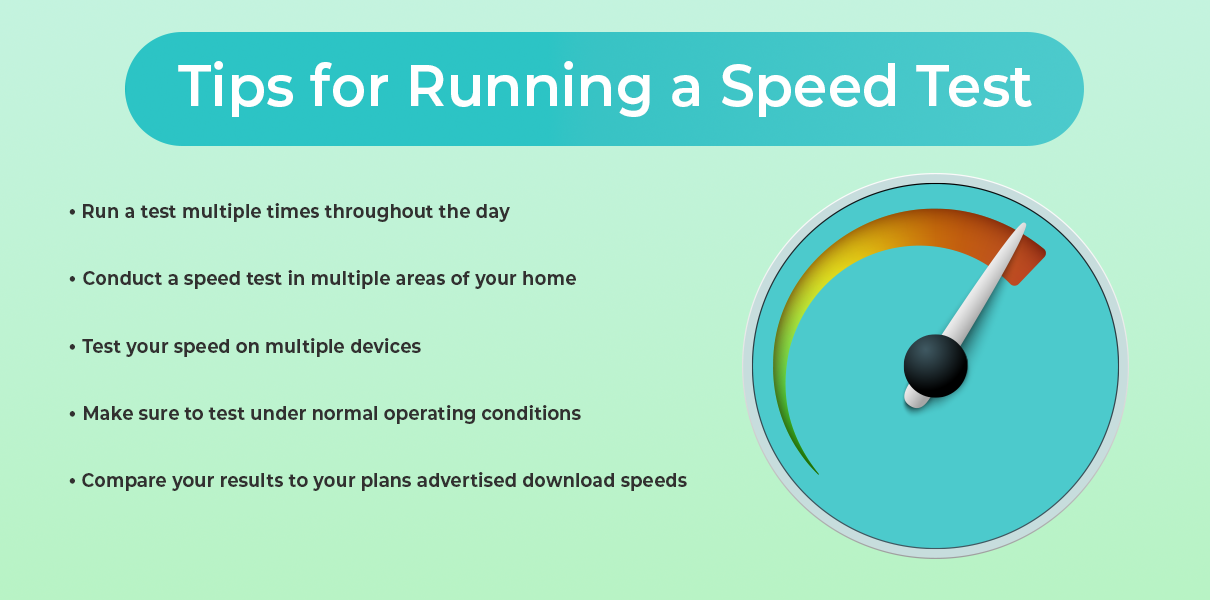
You can’t fix what you don’t measure. To get an accurate picture, you need more than just one test. 

  1. Test at different times: Speeds often dip in the evenings. 
  1. Compare Wired vs. Wi-Fi: If possible, plug a computer directly into your router with an ethernet cable. This tells you the true speed coming into your house, ruling out Wi-Fi interference. 
  1. Test multiple devices: If your phone is slow but your laptop is fast, the issue might be the phone. 

Identify Wi-Fi Weak Spots 

Walk around your home and run a test in every room. You might find that the living room is blazing fast, but the bedroom is a dead zone. 

  • Location-based issues: If speeds drop only in the back office, you might need a Wi-Fi extender or a mesh system. 
  • Device-based issues: If only your old tablet is slow everywhere, it’s time for an upgrade. 

Step 2: Compare Your Results to Your Plan

Check Whether You’re Getting the Speeds You Pay For 

Grab your latest bill or log into your ISP account. Find the “advertised speed” for your plan. Now, look at your internet speed test results. 

  • The Reality Check: If you pay for 500 Mbps but consistently get 50 Mbps over a wired connection, you have a serious problem. 
  • Reasonable Variation: Getting 450 Mbps on a 500 Mbps plan is normal. Getting 100 Mbps is not. 

Evaluate Whether You’re Overpaying 

Are you paying for “Gigabit” speed (1000 Mbps) but only using the internet to check email and watch YouTube? You might be overpaying. 

Household Size Activity Level Recommended Speed 
1-2 People Web browsing, Email 50-100 Mbps 
2-4 People HD Streaming, Zoom calls 200-400 Mbps 
4+ People 4K Streaming, Gaming 500+ Mbps (Gigabit) 

Step 3: Document Speed Issues for ISP Discussions 

If you call your ISP and say, “my internet feels slow,” they might just tell you to reboot your modem. If you say, “I’ve tested my speed every day for a week at 7 PM, and I’m getting 20 Mbps when I pay for 200,” they have to listen. 

  • What to record: Date, Time, Speed (Mbps), and whether you were on Wi-Fi or wired. 
  • Why it matters: This log is your evidence for requesting bill credits or a technician visit. 

Step 4: Determine Whether It’s Your Network or Your Provider

If Multiple Devices Are Slow → Network/ISP Issue 

If your TV, phone, and laptop are all buffering, the problem is likely the router or the service coming from the street. 

If Only One Device Is Slow → Device Issue 

If your PS5 is lagging but Netflix works fine on the TV, check the PS5’s settings or location. 

Check for Regional Outages 

Before you spend hours troubleshooting, check if your whole neighborhood is down. Sites like Downdetector or your ISP’s app can show service outages. 

Step 5: Use Your Data to Negotiate or Switch Providers

Armed with your data, call your ISP. 

  • Ask specific questions: “I see consistently high latency in the evenings. Is there node congestion in my area?” 
  • Demand value: “I’m getting half the speed I pay for. Can you lower my bill or fix the line?” 

Avoid Overpaying for Internet You Don’t Need

Marketing departments love to sell you the fastest, most expensive package. But do you need it? Gigabit internet is amazing, but overkill for a couple who just browse Facebook. Use your test history to see your actual usage needs and “right-size” your plan to save money. 

Troubleshooting Checklist

Before you sit on hold for an hour, try these quick fixes: 

  1. Restart Everything: Unplug your modem and router for 30 seconds. It fixes 90% of problems. 
  1. Update Firmware: Log into your router admin page and check for updates. 
  1. Move Your Router: Get it out of the closet! Ideally, it should be central and high up. 
  1. Replace Old Cables: That yellow ethernet cable from 2010 might be slowing you down. 
  1. Reduce Traffic: Disconnect devices you aren’t using. 

Get the Speeds You Pay For, Every Time

You work hard for your money, and your internet connection is vital for modern life. Don’t settle for sluggish speeds. By monitoring and testing regularly, you protect yourself from overpaying and ensure you have the bandwidth you need for work, play, and everything in between. 

Verify your speed today with TestMySpeed 

FAQs: Internet Speed

How do I know if I’m getting the speeds I pay for? 
Compare the “Download Mbps” result from a speed test to the speed listed on your monthly internet bill. If the test result is significantly lower (e.g., 50% less) consistently, you aren’t getting what you pay for. 

Why are my speeds slower than advertised? 
“Advertised” speeds are maximums. Real speeds are lowered by Wi-Fi interference, network congestion (traffic), old routers, and distance from the ISP hub. 

What internet speed does my home actually need? 
For a family of 4 streaming video and working from home, 500 Mbps is a safe bet. A single person can usually get by just fine with 100 Mbps. 

How often should I test my internet speed? 
We recommend testing once a month to ensure consistency, or immediately any time you notice buffering or lag. 
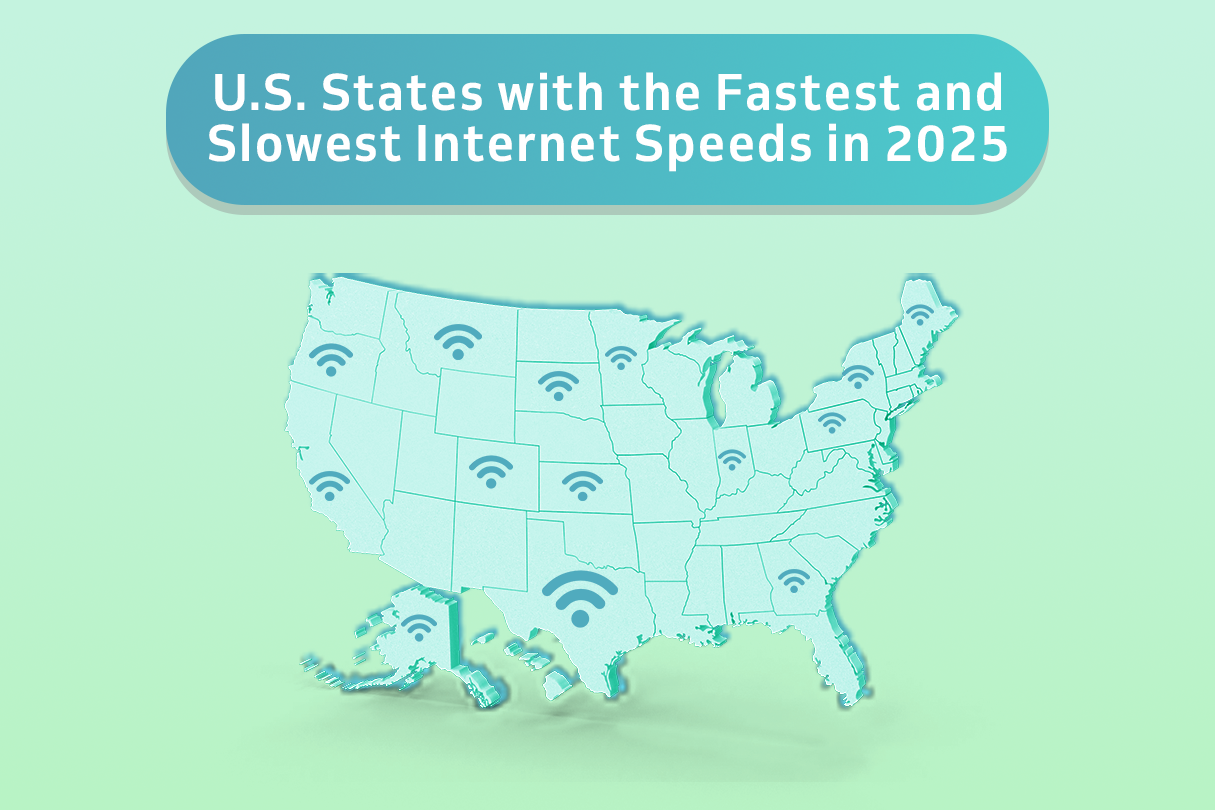
If you’re reading this, you might be curious about how your internet connection stacks up against the rest of the country. From bustling cities to quiet rural towns, internet speeds vary dramatically across the U.S. Fast, reliable internet has become essential for everyday life, shaping everything from how we work and learn to how we stream movies and connect with family. 

This guide will break down the latest data on internet speeds in the United States. We’ll define key terms like download and upload speeds, reveal the states with the fastest and slowest connections, identify the top Internet Service Providers (ISPs), and explore what factors cause these huge differences in performance. 

Key Takeaways for 2026

  • Average Internet Speed in the U.S.: The national average download speed is 214 Mbps, a 9% increase from 196 Mbps in 2024. 
  • Fastest State: Delaware leads the nation with an average download speed of 246.95 Mbps. 
  • Slowest State: Idaho has the slowest average internet speed in the US at 124.57 Mbps. 
  • Fastest ISPs in the U.S.: Fiber providers like EarthLink Fiber, AT&T Fiber, and Google Fiber consistently deliver top speeds, with Xfinity being a leading cable provider. 

National Internet Speed Ranking (Top 5): 

  • Delaware (246.95 Mbps) 
  • Maryland (238.26 Mbps) 
  • New Jersey (235.67 Mbps) 
  • Connecticut (233.88 Mbps) 
  • Florida (232.80 Mbps) 

Key Trend: The continued expansion of fiber optic networks is the primary driver for increasing the average internet speed in the US, particularly in coastal and southern states. 

Understanding Internet Speed: Download vs. Upload

Before we dive into the rankings, it’s helpful to understand what we mean by “internet speed.” Speed is typically measured in megabits per second (Mbps) and broken down into two numbers: 

  • Download Speed: This is how quickly your device can pull data from the internet. It affects how fast websites load, videos stream, and files download. 
  • Upload Speed: This is how quickly your device can send data to the internet. It’s important for video calls, online gaming, and uploading large files. 

For most people, download speed is the more critical number, which is why it’s the primary metric used in this report. 

The Average Internet Speed in the U.S. (2026 Overview)

In 2026, the average internet speed in the US is 214 Mbps. This represents a 9% increase from the 2024 average of 196 Mbps. This steady growth is largely thanks to nationwide initiatives like the Internet for All program and private investment in expanding high-speed fiber networks. 

These averages are calculated using data from millions of speed tests conducted by users across the country. Reputable sources like the Federal Communications Commission (FCC), Ookla, and M-Lab collect and analyze this data to provide a clear picture of the nation’s connectivity. 

Internet Speed Rankings by State

While the national average is rising, performance varies significantly from state to state. Below is a comprehensive table showing the internet speed ranking for all 50 states, highlighting the vast differences in digital infrastructure. 

Rank State Avg. Download Speed (Mbps) 
Delaware 246.95 
Maryland 238.26 
New Jersey 235.67 
Connecticut 233.88 
Florida 232.80 
Virginia 230.49 
Rhode Island 227.10 
Texas 225.74 
California 223.59 
10 Nevada 220.91 
11 Colorado 219.79 
12 Massachusetts 218.54 
13 Utah 218.06 
14 New Hampshire 217.06 
15 Oklahoma 216.91 
16 Oregon 209.69 
17 New York 208.05 
18 Indiana 206.46 
19 Tennessee 205.07 
20 Pennsylvania 204.66 
21 Louisiana 203.11 
22 Illinois 201.12 
23 Washington 201.11 
24 Arizona 200.64 
25 South Carolina 199.35 
26 North Carolina 197.61 
27 Missouri 196.43 
28 Georgia 194.98 
29 Arkansas 194.82 
30 Michigan 193.19 
31 Alabama 191.88 
32 Ohio 188.20 
33 Mississippi 187.07 
34 Kansas 186.88 
35 Kentucky 183.31 
36 Wisconsin 183.11 
37 DC 182.39 
38 Nebraska 177.37 
39 New Mexico 173.62 
40 Maine 173.23 
41 North Dakota 171.03 
42 Vermont 166.40 
43 West Virginia 164.85 
44 South Dakota 164.71 
45 Minnesota 164.68 
46 Iowa 150.74 
47 Wyoming 147.19 
48 Hawaii 146.07 
49 Montana 129.73 
50 Alaska 125.09 
51 Idaho 124.57 

Source: HighSpeedOptions 

The Fastest Internet Speeds in the U.S. 

States with the fastest internet speed in the US are largely concentrated in the Northeast, where dense populations and strong competition among providers have fueled major infrastructure investments. These states benefit from extensive fiber optic networks, which deliver more reliable and faster connections than older cable or DSL technologies. 

Top 5 States with the Fastest Internet: 

State Avg. Download Speed (Mbps) Most Common High-Speed Internet Type 
Delaware 246.95 Fiber & Cable 
Maryland 238.26 Fiber & Cable 
New Jersey 235.67 Fiber & Cable 
Connecticut 233.88 Fiber & Cable 
Florida 232.80 Fiber & Cable 

The Slowest Internet Speeds in the U.S. 

On the other end of the spectrum, states with slower speeds are often more rural and mountainous. The high cost of laying fiber optic cables and the smaller customer base in these regions make it difficult for providers to invest in new infrastructure. This digital divide highlights a significant challenge for remote work, education, and economic growth in these areas. 

However, government programs like the BEAD Program are working to close this gap by funding broadband expansion in underserved communities. 

5 States with the Slowest Internet: 

State Avg. Download Speed (Mbps) Most Common High-Speed Internet Type 
Idaho 124.57 Cable & DSL 
Alaska 125.09 Cable & Satellite 
Montana 129.73 Cable & DSL 
Hawaii 146.07 Cable & DSL 
Wyoming 147.19 Cable & DSL 

What are the Fastest ISPs in the U.S.? 

When it comes to providers, fiber optic internet is the undisputed king of speed. The fastest ISPs in the country leverage fiber technology to offer symmetrical download and upload speeds that can reach well beyond 1,000 Mbps (1 Gbps). 

  • National Fiber Leaders: Google Fiber, EarthLink Fiber, and AT&T Fiber are consistently ranked among the fastest providers nationwide. Their pure fiber networks offer superior performance and reliability compared to other connection types. 
  • Top Cable Providers: While not as fast as fiber, cable internet from providers like Xfinity and Spectrum offers a widely available alternative with speeds that are more than enough for most households. Innovations like DOCSIS 4.0 technology are helping cable catch up, promising multi-gigabit speeds in the near future. 
  • The Rise of 5G Home Internet: 5G home internet from providers like T-Mobile and Verizon is becoming a viable alternative, especially in areas with limited wired options. While speeds can be less consistent than fiber or cable, it’s an important technology for expanding broadband access. 

What Impacts Internet Speed by State? 

The disparity in internet speed by state is not random. Several key factors contribute to why one state might have blazing-fast connections while another lags behind: 

  • Fiber Availability: This is the single biggest factor. States with extensive fiber-to-the-home networks consistently have higher average speeds. 
  • Population Density: It’s more cost-effective for providers to build and maintain networks in densely populated urban areas than in sprawling rural regions. 
  • Competition and Investment: When multiple providers compete for customers in a market, it drives down prices and encourages investment in faster, better infrastructure. 
  • Geography and Terrain: Laying fiber optic cables across mountains, vast deserts, or remote islands is incredibly challenging and expensive, which slows down deployment in states with difficult terrain. 

Want to see how your own connection measures up? You can use a free tool like the TestMySpeed to check your personal internet speed and compare it to your state’s average. 

Frequently Asked Questions: Speeds by State  

What is the average internet speed in the U.S. in 2026? 
The average download speed in the U.S. is 214 Mbps as of early 2026. This is a significant increase from previous years, driven by the expansion of fiber optic networks. 

Which state has the fastest internet speed in the U.S.? 
Delaware has the fastest internet speed in the US, with an average download speed of 246.95 Mbps. 

What are the top 5 fastest ISPs in the U.S.? 
While rankings can vary, the fastest ISPs are typically fiber providers. Google Fiber, EarthLink Fiber, AT&T Fiber, Verizon Fios, and Xfinity (as a top cable provider) are all considered among the fastest and most reliable options available. 

Why is internet slower in some states? 
Internet is slower in certain states primarily due to a lack of modern infrastructure, particularly fiber optic networks. Rural geography, low population density, and less competition among providers are major contributing factors. 

How can I check my internet speed and compare it to my state average? 
You can use a free online speed test tool like TestMySpeed to measure your current download and upload speeds. You can then compare your results to the state averages listed in the table in this article. 

What’s Next for U.S. Internet Speeds 

The future of internet in the U.S. looks bright and fast. We can expect the internet speed ranking to continue shifting as several key developments unfold: 

  • Continued Fiber Expansion: With ongoing private investment and government funding, fiber networks will reach more communities, pushing the national average speed even higher. 
  • Closing the Rural Divide: Initiatives aimed at bringing high-speed internet to rural and underserved areas will begin to narrow the digital divide, improving speeds in states that currently lag. 
  • 5G Home Internet Growth: As the 5G network expands and matures, it will provide a competitive high-speed option for millions more Americans. 

These trends suggest that by 2027, even more households will have access to the gigabit speeds needed to power our increasingly connected lives. 

Have you ever wondered how much data you’re using when streaming your favorite shows or music? Streaming, which involves continuously receiving data to watch videos or listen to music online, has become a huge part of our daily lives. We’ve shifted from renting DVDs or buying CDs to on-demand subscriptions, making streaming services like Netflix, Spotify, and Disney+ household staples. 

Streaming services have seen explosive growth in recent years. For instance, Netflix boasts over 301.63 million subscribers worldwide, while Disney+ has quickly grown to 124.6 million subscribers since its launch. With more people streaming than ever before, understanding our data usage is crucial. In this article, we’ll explore how streaming impacts our data consumption and what it means for us. 

How Streaming Works

Streaming is essentially a continuous flow of data from the source to our devices, allowing us to enjoy media in real-time. When we stream, the content plays almost immediately, without waiting for a full download. This contrasts with downloading, where we save the entire file to our device before accessing it. 

How Streaming Works

Streaming comes in various forms, each serving different entertainment needs. 

  • Music Streaming: Music streaming services like Spotify and Apple Music have revolutionized how we listen to tunes. As of 2024, Spotify leads with over 100 million tracks and millions of users worldwide, offering both free and premium plans. The rise of high-quality audio options, like Tidal’s CD-quality streams, ensures that audiophiles get the best listening experience possible. 
  • Video Streaming: Video streaming giants like Netflix, Disney+, and Amazon Prime Video dominate the market, each offering vast libraries of movies, TV shows, and original content. The convenience and variety these services provide have made them incredibly popular, with users streaming for an average of 3.1 hours daily
  • Live Streaming: Live streaming has exploded in popularity, especially with platforms like Facebook, Twitch and YouTube Live. In 2021, live video usage on Facebook surged by more than 50 percent. These services allow users to broadcast in real-time, whether it’s gaming, events, or personal vlogs. 
  • Game Streaming: Game streaming services like Xbox Cloud Gaming and Nvidia GeForce Now let us play high-end games without expensive hardware. These platforms stream the game from powerful servers directly to our devices. With the gaming industry booming, services like game streaming are becoming more popular, expected to reach 1.8 billion users by 2029, offering access from anywhere. 

Video Quality

The quality of the video we stream has a direct effect on data usage. Higher quality videos use more data. Here’s how different video qualities stack up: 

  • Standard Definition (SD): Streaming in standard definition (SD) typically uses around 0.7 to 1 GB of data per hour. This is a good option if we want to save data, especially when using mobile networks. Services like Netflix allow us to choose SD to keep data consumption low, which is ideal for those with limited data plans. 
  • High Definition (HD): High definition (HD) streaming, which offers a clearer and more detailed picture, uses about 1.5 to 2.5 GB of data per hour. Watching popular series or movies in HD on platforms like Hulu or Disney+ can provide a great viewing experience without excessively high data use. 
  • Full HD (FHD): Full HD (FHD) streaming, offering even sharper quality than HD, consumes approximately 2 to 3 GB of data per hour. This is common for most YouTube videos or series on Amazon Prime, providing a crisp and immersive viewing experience for users with moderate data allowances. 
  • Ultra High Definition (UHD) or 4K: Ultra High Definition (UHD) or 4K streaming takes our viewing to the next level but at a cost of around 7 to 10 GB of data per hour. Streaming platforms like Netflix and Amazon Prime offer 4K content for an ultra-crisp viewing experience, best suited for large screens and high-speed internet connections. 
  • 8K Streaming: 8K streaming is the newest and highest video quality, using an enormous amount of data, approximately 20 to 30 GB per hour. While still not widespread, services are beginning to offer 8K content for viewers with top-of-the-line equipment and internet speeds, providing unparalleled clarity and detail. 

Content Length

The length of the content we stream is a major factor in data usage. Short clips and full-length movies differ significantly in how much data they consume. 

Short Clips vs. Full-Length Movies

Short clips, like YouTube or TikTok videos, usually range from a few seconds to a couple of minutes. These short-form videos typically use less data, about 150-375 MB per hour depending on the quality. They are ideal for quick entertainment bursts and are particularly popular on mobile devices. 

Full-length movies, on the other hand, can consume a lot more data. For example, streaming a two-hour HD movie can use up to 6 GB of data while the same movie in 4K can use up to 14 GB. High-definition content on platforms like Netflix and Disney+ requires more data due to the extended viewing time and higher quality. Thus, watching a full-length movie is more data-intensive compared to short clips, making it essential to be mindful of data usage, especially on limited data plans. 

Series Binging

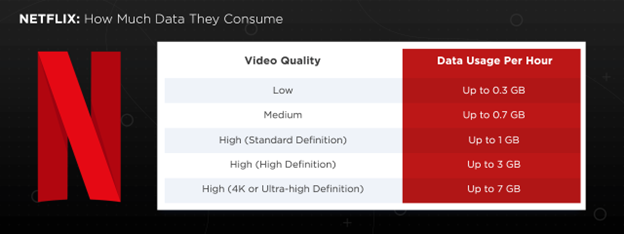
Binge-watching is a double-edged sword. Sure, it’s great to plow through episodes of our favorite series back-to-back, but it also means we’re consuming a lot of data. Watching several episodes in one sitting can quickly rack up the data usage. For instance, streaming Netflix in HD for an hour consumes about 3GB of data. So, if you’re binge-watching a series with ten episodes, you’re looking at around 30GB of data for just one sitting.  

And if you’re watching in 4K, it’s even more—about 7GB per hour. That’s a lot of data, especially if we’re not on an unlimited plan. So, while binge-watching might be a cozy weekend activity, it definitely has a big impact on our data usage. 

Platform Optimization

Adaptive Bitrate Streaming

Adaptive bitrate streaming is a clever technology where the quality of a video adjusts on the fly based on the viewer’s internet speed. If our connection slows down, the video quality drops to avoid buffering; when it speeds up, the quality improves. This ensures a smoother viewing experience without constant interruptions. 

By dynamically adjusting the video quality, adaptive bitrate streaming helps manage data usage more efficiently. It minimizes buffering, enhancing our viewing experience, especially on fluctuating network connections. Services like Netflix and YouTube widely use this technology to provide seamless streaming. 

Adaptive Bitrate Streaming

Compression technologies are essential for reducing file sizes without significantly compromising video quality. These technologies use various codecs to efficiently transmit data, making streaming more manageable even on limited bandwidth. Here are five key compression technologies: 

  • H.264: Widely used and supported, H.264 balances good compression efficiency and video quality, making it ideal for a broad range of devices and applications. 
  • VP9: Developed by Google, VP9 offers similar compression efficiency to H.265 but is royalty-free, making it a popular choice for web-based video, including YouTube. 

How Streaming Affects Your Data Plan

Streaming services like Netflix, YouTube, and Spotify offer content in various resolutions, and these resolutions directly impact data consumption. Here’s how the data usage breaks down for different qualities: 

  • SD (480p): ~1 GB per hour 
  • HD (720p – 1080p): ~3 GB per hour 
  • 4K (Ultra HD): ~7-10 GB per hour 
  • 8K: ~20-30 GB per hour 

This means that households with multiple streamers can quickly run up data usage. For example, if you’re streaming in 4K, an entire day of streaming can easily push you over your data cap on certain plans. 

Popular Streaming Services + How Much Data They Consume

Streaming services have become a staple in our daily lives, but they can consume a significant amount of data. Let’s take a closer look at how much data Netflix uses, one of the most popular streaming platforms. 

Netflix

Netflix is known for its diverse content library, ranging from movies and series to documentaries. However, the data consumption varies significantly depending on the video quality settings. 

Netflix Quality Setting Data

An auto video quality option is available, automatically adjusting to the highest quality your internet can handle without excessive buffering. This feature ensures the best picture quality your connection and Netflix account type allow, potentially increasing data usage per hour. It provides a seamless viewing experience, balancing quality and connection capabilities effectively. 

YouTube

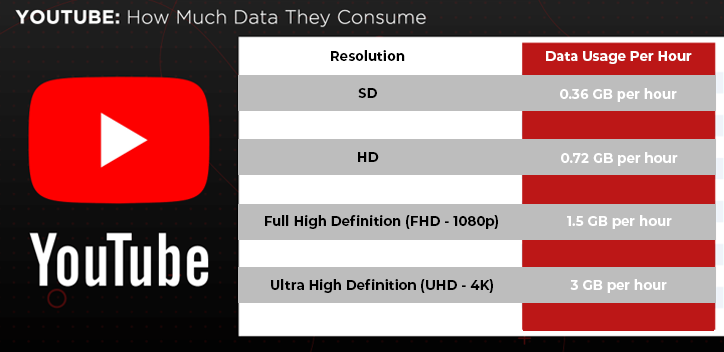
Live streaming on YouTube involves real-time transmission, which typically requires more data due to the continuous high-speed upload and download process. Higher resolutions, such as 1080p or 4K, increase data consumption significantly. For instance, streaming in 1080p can use about 1.5 GB per hour, while 4K can use up to 3 GB per hour. 

YouTube Quality Setting Data

Amazon Prime Video

When streaming shows or movies on Amazon Prime Video, data usage varies based on the resolution and quality settings. For example, watching a show in Standard Definition, which Amazon labels as ‘Good’ Quality, uses about 0.45 GB per hour. For ‘Better‘ quality at HD, it uses around 2.25 GB per hour. Streaming in 4K Ultra HD can consume between 6GB and 7GB per hour. 

Amazon Prime Quality Setting Data

Disney+

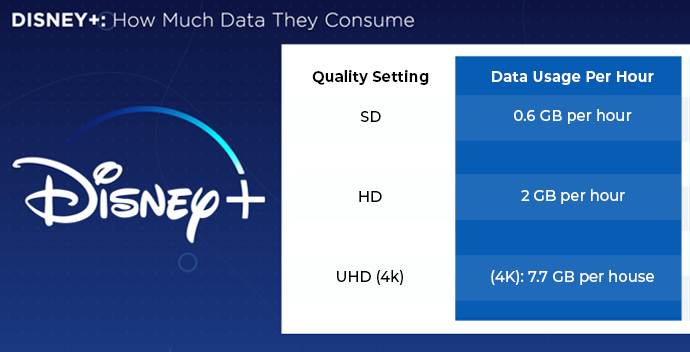
Disney+ allows us to adjust quality settings to manage our data usage effectively. You can select from various quality options, including SD, HD, and 4K Ultra HD. The app also offers an Auto setting, which adjusts the video quality based on your current internet connection to ensure the best streaming experience without excessive data usage. 

Disney Plus Quality Setting Data

Hulu

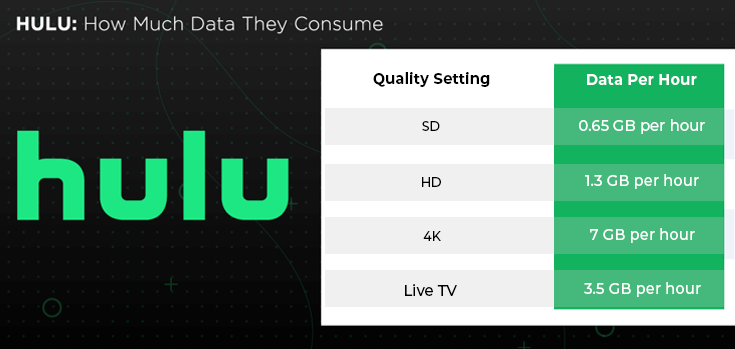
Streaming live TV on Hulu uses more data compared to on-demand content. Live TV requires real-time data transmission, resulting in higher data consumption. For example, streaming live TV in HD on Hulu can consume up to 3.5 GB per hour, whereas on-demand content in HD typically uses around 1.3 GB per hour. 

Hulu Quality Setting Data

Spotify

Downloading music for offline listening on Spotify can save significant amounts of data in the long run. When you download songs, you use data only once during the download, rather than every time you play the song. This is particularly useful if you listen to your favorite tracks repeatedly.  

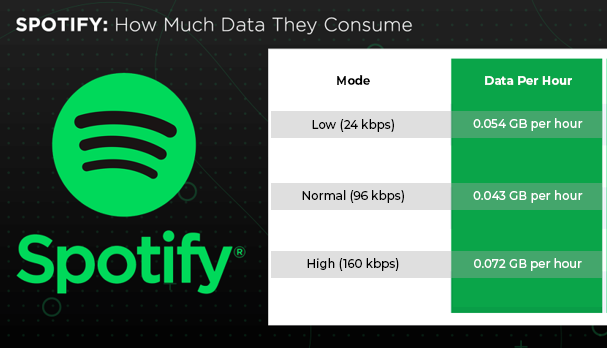
For instance, streaming an hour of music at the highest quality can use up to 0.072 GB, which quickly adds up over time. By downloading, you eliminate continuous data use, providing a more data-efficient way to enjoy music. 

Spotify Quality Setting Data

Apple Music

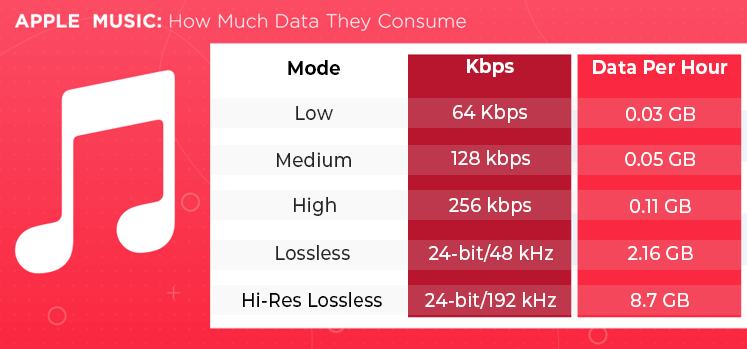
Apple Music, with its 93 million subscribers as of 2024, offers different quality settings that affect data usage. For instance, streaming music at the default high quality (256 kbps) uses about 0.11 GB per hour. At the highest quality of Hi-Res Lossless (24-bit/192 kHz), users will consume up to 8.7 GB per hour. This flexibility allows us to manage our data consumption based on our needs and internet plans. 

Apple Music Quality Setting Data

Twitch

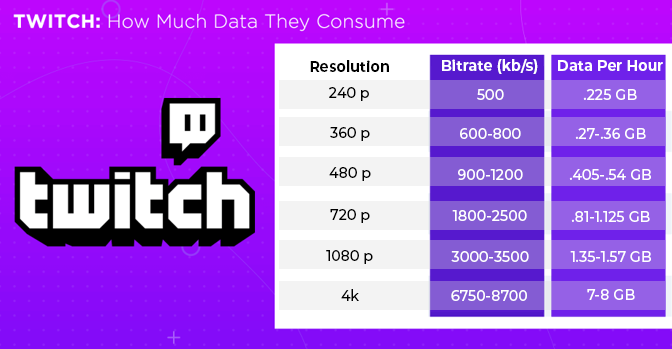
Twitch, a leading platform for live streaming, especially in gaming and creative content, can consume a significant amount of data depending on the quality of the stream. As with other streaming services, the higher the resolution, the more data it uses. On Twitch, video quality can range from 480p all the way up to 1080p or even higher. Here’s a general breakdown of Twitch data usage based on stream quality: 

Twitch Quality Setting Data

Compare internet plans that support 4K streaming all day, every day.  

Data Usage in Different Streaming Scenarios

Home Internet vs. Mobile Data

How we stream content—whether at home or on the go—can significantly affect our data usage. Let’s explore how home internet and mobile data compare in terms of streaming. 

Differences in Data Caps and Speeds

Home internet plans generally have higher data caps or no caps at all, which is great for heavy streaming. For example, many ISPs offer unlimited data plans that allow us to stream in 4K without concern.  

Mobile data plans, on the other hand, usually have limited data caps, with overage charges or throttling once the limit is reached. Streaming over a home network tends to be faster and more stable, while mobile networks can be slower and less reliable, affecting streaming quality. 

Wi-Fi vs. Cellular Data Streaming

Streaming over Wi-Fi is almost always cheaper and more efficient than using cellular data. Wi-Fi connections generally don’t count towards mobile data limits and often offer faster speeds. Here are some strategies to minimize data usage on mobile networks: 

  1. Download Content: Use Wi-Fi to download movies, music, or shows for offline viewing. 
  1. Lower Quality: Reduce streaming quality settings in apps like Netflix and YouTube. 
  1. Data Saver Modes: Enable data saver modes available in most streaming apps. 
  1. Track Usage: Monitor your data usage regularly to avoid overage charges. 
  1. Use Wi-Fi Hotspots: Connect to free Wi-Fi hotspots whenever possible. 
  1. Limit Background Data: Restrict background data usage for non-essential apps. 
  1. Stream Audio Only: Listen to the audio-only version of videos when possible. 

Travel and Commuting

When we’re on the move, streaming can quickly eat up our mobile data. Using offline downloads instead of streaming online can be a game-changer, especially during long commutes or travel. 

Offline Downloads vs. Online Streaming

Downloading content for offline viewing offers several benefits that can help save mobile data and improve convenience: 

  1. Data Savings: Downloads use data once, whereas streaming uses data every time you watch. 
  1. No Buffering: Enjoy uninterrupted playback without worrying about weak signals. 
  1. Battery Efficiency: Offline playback typically consumes less battery than streaming. 
  1. Cost Efficiency: Avoid exceeding data limits and incurring extra charges. 
  1. Accessibility: Watch content without needing an internet connection. 
  1. Consistency: Maintain high-quality playback without relying on fluctuating network speeds. 
  1. Flexibility: Download a variety of content to suit different tastes and moods. 

Data Usage on Public Wi-Fi vs. Mobile Networks

Streaming on public Wi-Fi can save your mobile data but comes with security risks. Public Wi-Fi networks are often less secure, making them susceptible to hacking. Mobile networks, while more secure, can be costly if you exceed your data plan limits. 

When using public Wi-Fi, ensure you’re connected to a trusted network and consider using a VPN for added security. Streaming over mobile data should be reserved for short durations or when no secure Wi-Fi is available to avoid high data charges. 

Data Caps and Internet Plans

Internet Service Providers (ISPs) often implement data caps to limit how much data we can use each month. Exceeding these limits can result in costly overage charges or reduced speeds. This practice is especially relevant as more people stream high-definition content. 

Usage-based pricing has been a point of contention among ISPs, with some arguing that data caps are necessary to manage network congestion, while others believe that these caps are simply profit-driven. The International Center for Law & Economics notes that pricing models based on consumption can help align costs with data usage, ensuring that heavy users pay more. 

In the coming years, as streaming continues to dominate internet traffic, these data caps could become more significant. Consumers should be mindful of their data usage and consider choosing internet plans that suit their streaming habits. 

Here’s how some common data caps compare to typical streaming data usage: 

  • AT&T Internet: 1,024 GB cap, unlimited data available for an extra $30/month.  Streaming in 4K for 2 hours per day will consume about 420 GB per month.  
  • Xfinity: 1.2 TB cap. Unlimited data is available for an extra $30 per month.  
  • Cox Communications: 1.25 TB cap. Unlimited data can be added for an additional $49.99 per month. 

To manage data usage effectively, consider these practical tips: 

  1. Prioritize Wi-Fi: Stream over Wi-Fi whenever possible to avoid using mobile data. 
  1. Adjust Quality: Lower the streaming quality to save data. 
  1. Monitor Usage: Keep track of your data usage through ISP apps or settings. 
  1. Download Content: Use offline downloads for your favorite shows and music. 
  1. Set Data Alerts: Enable data alerts to notify you when you’re nearing your limit. 
  1. Limit Background Data: Restrict background data usage on your devices. 
  1. Use Data Saver Modes: Activate data saver modes in streaming apps. 

Adjusting Streaming Settings

Adjusting video quality and utilizing data-saving modes are essential strategies for managing data usage while streaming. Here’s how to make these adjustments on popular streaming services.

Lowering Video Quality

Reducing video quality can significantly cut down on data usage. Here’s how to do it on popular streaming services: 

Netflix 

  1. Go to Netflix.com and log in. 
  1. Click on your profile icon and select “Account.” 
  1. Under “Profile & Parental Controls,” choose your profile. 
  1. Click on “Playback settings.” 
  1. Select the desired quality: Auto, Low, Medium, or High
  1. Click “Save”  

Amazon Prime Video 

  1. Open the Prime Video app. 
  1. Go to “Settings” > “Stream & Download” > “Streaming Quality.” 
  1. Choose between “Good,” “Better,” and “Best.” 

YouTube 

  1. Click the gear icon on the video player. 
  1. Select “Quality” and choose your preferred resolution (e.g., 144p, 240p, 360p, etc.) 

Disney+ 

  1. Go to DisneyPlus.com, log in, and hover over your profile icon. 
  1. Select “App Settings.” 
  1. Choose “Data Usage” and select your preferred option. 

Hulu 

  1. While watching, click the gear icon
  1. Select “Data Saver” to limit consumption. 

Apple TV 

  1. Open the app and go to “Settings“. 
  1. Navigate to “Streaming & Downloading” and choose HD or SD

Using Data-Saving Modes

Many streaming services offer data-saving modes that optimize streaming quality based on your internet connection to minimize data usage. 

Benefits: 

  1. Reduces data consumption. 
  1. Prevents buffering on slower connections. 
  1. Extends data limits for longer streaming. 
  1. Useful for mobile data plans. 
  1. Automatically adjusts to optimal settings. 
  1. Helps avoid additional data charges. 
  1. Provides a smoother streaming experience on fluctuating networks. 

Trade-offs: 

  1. Lower video quality. 
  1. Possible reduction in picture clarity. 
  1. May affect the viewing experience for high-definition content. 
  1. Not all content may support lower quality settings. 
  1. Requires manual activation on some devices. 
  1. Can impact the overall enjoyment of visually rich media. 
  1. May not be suitable for large screens or high-resolution displays. 

Tools to Monitor Your Data Usage

Managing your data consumption can be tricky, especially as streaming services provide options to increase video quality. Fortunately, there are several tools available to help you track how much data you’re using. These apps help you stay on top of your data consumption, ensuring you can enjoy streaming without exceeding your limits: 

  • My Data Manager: This app tracks your data usage across mobile, Wi-Fi, and roaming. It provides real-time alerts to help you avoid overage charges and manage your data plan efficiently.  
  • GlassWire Data Usage Monitor: Known for its real-time graphs and intuitive interface, GlassWire helps identify apps that consume the most data and offers a firewall to block specific apps from using data. It’s free with optional in-app purchases for additional features. 
  • Data Usage Monitor: This app automatically tracks data usage as soon as it’s launched, provides alerts for data thresholds, and offers a simple interface for easy understanding. It’s free with ads and in-app purchases. 
  • NetGuard: NetGuard offers a simple way to block apps from accessing the internet, helping save data. It’s great for monitoring both cellular and Wi-Fi data usage and includes features like data logging and per-app data usage monitoring. 
  • Data Counter Widget: This app provides a widget for your home screen to monitor Wi-Fi and mobile data usage in real-time. It’s particularly useful for quick data checks and is free to use. 
  • OBS Studio: This popular streaming software offers built-in data usage monitoring, making it an excellent tool for streamers and content creators. It helps users stay within their data limits while broadcasting live content, ensuring smooth streaming without exceeding data caps. 

Future Trends in Streaming and Data Usage

5G and Its Impact on Streaming

The rollout of 5G technology promises to revolutionize streaming by offering faster speeds and lower latency. Here’s how 5G will enhance streaming capabilities: 

  • Increased Bandwidth: 5G offers significantly more bandwidth than 4G, enabling smoother and higher-quality streams, even in high-definition and 4K. 
  • Lower Latency: With latency reduced to as low as one millisecond, 5G ensures real-time streaming with minimal delay, enhancing live broadcasts and interactive content. 
  • Higher Speeds: 5G speeds are up to 100 times faster than 4G, allowing for quicker downloads and more efficient streaming, making HD and 4K streaming more accessible on mobile devices. 
  • Enhanced Connectivity: 5G improves connectivity in densely populated areas like stadiums and concert venues, ensuring a reliable streaming experience even in crowded environments. 
  • Better Home Experiences: The rise of 5G will also alleviate the pressure on home internet connections, providing a seamless streaming experience no matter where you are. 
  • Support for Advanced Technologies: 5G enables new streaming applications, including augmented reality (AR) and virtual reality (VR), providing more immersive and interactive viewing experiences. 
  • Sustainable Streaming: Additionally, as streaming services face growing environmental and economic challenges, expect to see more focus on sustainability and network optimization. We could see an increase in efforts by streaming platforms to reduce their energy consumption through better infrastructure and carbon offset projects. 

Regulatory Developments with Data and Streaming

The Federal Communications Commission (FCC) is investigating the impact of data caps on consumers. This inquiry could lead to changes that would protect consumers from excessive fees and ensure equitable access to streaming services. As reported by The Verge, this investigation might spark reforms aimed at limiting the burden of data caps on households that rely heavily on streaming. 

With the increasing demand for high-quality streaming, especially in 4K, these regulations could help balance the need for reliable internet access with fair pricing. Keep an eye on these developments, as they could significantly impact how much you pay for streaming services in the future. 

Impact of New Players in the Market

The entry of new streaming services is reshaping the competitive landscape and influencing data consumption trends. As more companies enter the market, each with their own unique offerings and quality settings, the overall data consumption is expected to rise. For instance, with 99 percent of U.S. households subscribing to at least one streaming service and the average household having multiple subscriptions, the data usage per household is growing significantly. 

New entrants in the market often push existing services to improve their quality and features, leading to increased data consumption. Additionally, competitive pricing and bundles may make high-quality streaming more accessible, further driving up data usage. 

Environmental Impact of Data Centers

Data centers, the backbone of streaming services, consume vast amounts of energy and water, contributing significantly to their carbon footprint. These centers accounted for 1% to 1.5% of the world’s energy consumption in 2022, before the AI boom. The primary environmental concerns include electricity consumption to power servers, water usage for cooling, and the need to replace equipment every few years due to technological advancements. 

In addition to the energy consumed by data centers, the increasing demand for streaming services adds to the environmental burden. Streaming in higher resolutions like 4K and 8K not only impacts user data plans but also exacerbates the energy consumption of data centers. This has raised concerns about the growing carbon footprint of digital media. According to The Guardian, the energy consumption required to stream videos globally has now reached a scale comparable to traditional industries, making it one of the significant contributors to climate change. 

To address these issues, many streaming services are implementing more sustainable practices. Netflix aims to achieve net-zero greenhouse gas emissions by 2022 by reducing internal emissions and investing in carbon offset projects. Similarly, Hulu has transitioned to data centers powered entirely by renewable energy since 2018. These efforts are part of a broader movement towards greener technology and more efficient data centers, which include the use of renewable energy sources and advancements in cooling technologies. 

For eco-conscious consumers, one way to mitigate the environmental impact of streaming is to reduce video quality or download content for offline viewing. Lowering the resolution from 4K to HD or SD can significantly decrease the amount of energy required by data centers, helping reduce the carbon footprint associated with online entertainment. 

The Final Thoughts

Streaming has transformed how we consume media, offering unparalleled convenience and access to diverse content. However, it’s essential to be aware of the significant data usage and environmental impacts. With advancements like 5G, improved data compression, and more sustainable data centers, the future of streaming promises better quality and efficiency. 

Looking ahead, the key will be balancing our streaming habits with mindful data management. By leveraging new technologies and supporting eco-friendly practices, we can enjoy our favorite shows and music while minimizing our digital footprint. Streaming smartly ensures we get the best experience without compromising our data plans or the planet. 

FAQs

How does streaming affect my internet speed? 

Streaming can slow down your internet speed by consuming significant bandwidth, especially if multiple devices are streaming simultaneously. High-definition and 4K streaming require more bandwidth, which can lead to slower internet speeds for other activities on your network. Managing your streaming quality settings can help mitigate this impact. 

What is the difference between buffering and lagging? 

Buffering occurs when your video pauses to load more data, often due to a slow internet connection. Lagging, on the other hand, refers to delays or interruptions in the video or audio stream, which can be caused by high latency or low bandwidth. Both issues disrupt the streaming experience, but their causes and solutions differ. 

Can I stream content without an internet connection? 

Yes, you can stream content without an active internet connection by downloading it for offline viewing. Many streaming services like Netflix, Amazon Prime, and Disney+ offer this feature, allowing us to enjoy content without using mobile data or Wi-Fi. 

How does VPN usage affect streaming and data usage? 

Using a VPN can increase latency and reduce internet speed due to the extra distance data must travel. It can also bypass geo-restrictions, but be mindful that some VPNs may slow down your connection, impacting streaming quality. 

How can I test my internet speed to ensure it supports streaming? 

You can test your internet speed using our online speed test. We measure your download and upload speeds, as well as latency. To ensure your connection supports streaming, compare your results with the recommended speeds for different streaming qualities (e.g., 5 Mbps for HD, 25 Mbps for 4K). 

Social media has taken over much of the internet and our lives, yet how much do we know about how it works? Just how popular is it? How is it changing over time to meet the needs of our social lives? There is so much to learn and to potentially find out, and yet so little time to do so for most people. We were interested ourselves and knew our readers would be as well, so we looked into the topic and found some key points and facets to talk about. As one would expect, social media is changing rapidly, and in important ways. 

Data and careful study has provided us with most of the answers to the questions above, and an educated guess on the rest. Therefore, let’s start with those points. Here are 10 social media statistics that will give you an overview of the industry landscape in 2025: 

1. There are 5.56 Billion Global Social Media Users

As of April 2025, there are 5.24 billion social media user identities across the world, and that has only grown. This totals about 63.9% of the world’s population. It is clearly a huge market, but it also shows some room for growth. There will be people who will never adopt social media for one reason or another (and for better or for worse), but there will always be such cases when it comes to technology. 

What is interesting, though, is that the market so far is mostly saturated as far as internet users are concerned. From the same source, there are 5.56 billion internet users in one form or another. Realistically, internet users have more than one social media profile. Both the number of social media identities and internet users continues to climb as internet adoption becomes more common around the world.  

A few things to note here are that the population of people aged 13 and under cannot be counted as users in most instances, as platforms restrict usage.  

2. People Spend an Average of 2 Hours, 23 Minutes on Social Media Each Day

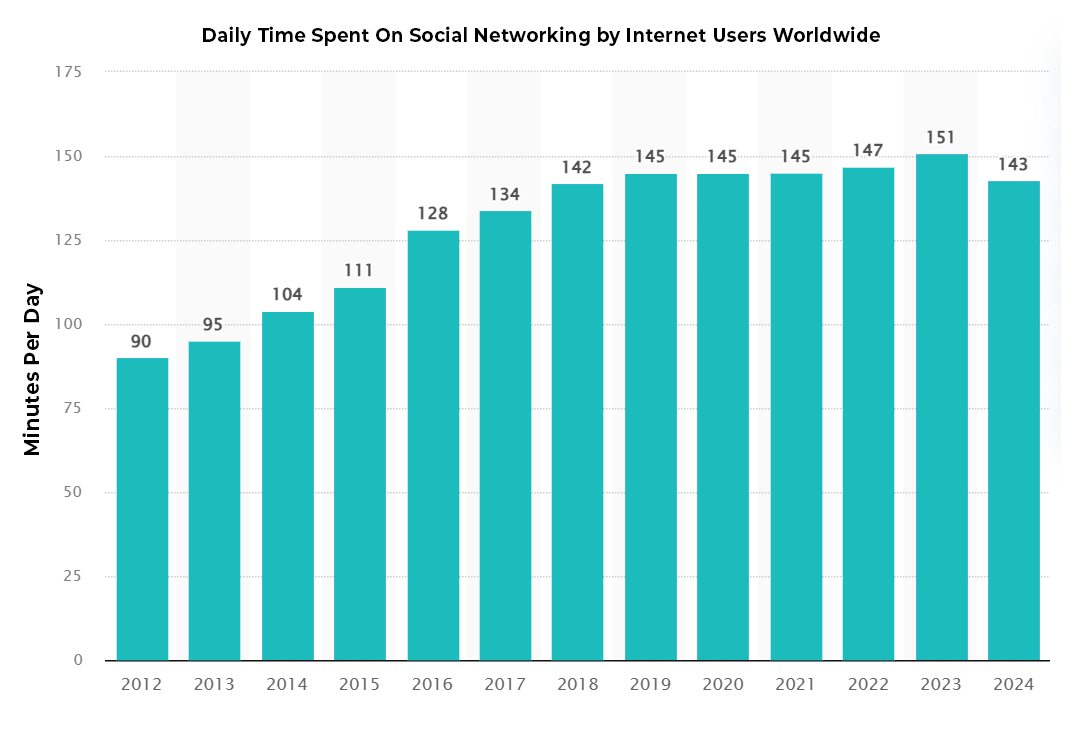
People use social media a lot more than they might admit. In fact, people spend nearly 143 minutes every single day on social media. That’s about 16.6 hours a week for a quick calculation.  

Surprisingly, this is the first time in 12 years that time spent on social media has gone down and not up. While 2 hours and 23 minutes a day might sound like a lot, it’s down significantly from 2023’s highest recorded average of 2 hours and 31 minutes. Even though it’s just a few minutes difference, we haven’t seen social media average use times like this since before the COVID-19 pandemic. To put it in perceptive, social media users averaged 142 minutes a day in 2018 and 90 minutes in 2012.  

Remember, these numbers are averages, meaning there are users spending a bit more than one day out of each week on social media. That’s a lot of time and a significant amount of attention going into these apps. Some users might check one account once a month for messages from family and not engage with the platform otherwise. Others use social media for work, or they’re trying to break through the competitive influencer market. Either way, time spent on social media is just one part of the equation; the other is how you’re using it.  

Social networking usage graph

3. The Average Person Uses 6.8 Different Social Media Platforms Each Month

How many social media apps do you regularly use? While you have your favorites, for sure, there is likely a good number of platforms where you have accounts but rarely, if ever, log in. Or there are platforms you might use without realizing it’s considered a social platform, like WhatsApp or YouTube.  

The average person uses 6.8 platforms in total each month. Again, this brings us back to the number of social media identities around the world. If you have one social media account, you likely have more!  

The top apps across the world are YouTube, WhatsApp, Facebook, Instagram, TiktTok, Messenger, Telegram, Snapchat, X, Pinterest, Discord, Threads, LinkedIn, Line and Reddit. 

4. Facebook Is Still the Most Used Social Media Platform

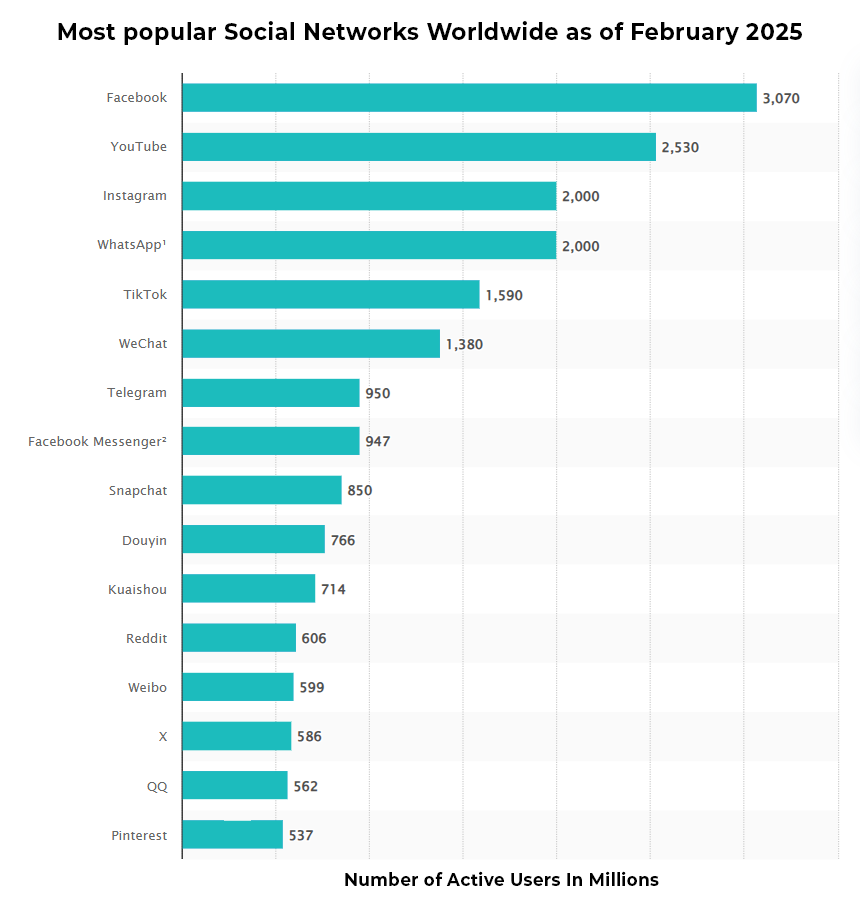
Facebook might have been the first global social media platform. While Myspace was popular in the early 2000s, its usage was still limited to younger demographics. Facebook has only grown since its inception, at least in its size as a company and its influence over people. And if you’re counting the total number of users, it’s still on top with 3.07 billion monthly active users (MAUs).

Popular social media graph

And while Facebook is still on top, YouTube isn’t far behind with 2.53 billion MAUs. Instagram and WhatsApp are tied with about 2 billion MAUs each. TikTok has also secured the fifth spot for most popular social media app at 1.59 billion MAUs.   

It may not be long before Facebook is dethroned as the most popular app. Its user base is growing older, and the only demographic that it is growing with is people over the age of 55. This isn’t ideal for Meta’s advertising hopes, and explains why they’re targeting younger demographics on Instagram.  

5. In the United States, Overall Growth Is Stagnant

While social media is predicted to grow as more people get access to smartphones, the market is saturated in the United States. Everyone can get online, and everyone can get a smartphone, computer, and several social media accounts in the process. 

If you look back over the last few years, there was a bit of growth in social media usage due to the pandemic, but previously, there was a dip. Thanks to a cultural shift, more users were becoming aware of the time they spent on social media, and people were disabling their accounts, sometimes deleting them. Many moved over to other social media outlets, while others chose to monitor their screentime.  

6. There Are Huge Demographic Differences in Platform Usage

Like many services, websites, and media outlets, different demographic groups tend to have niche preferences in social media platforms. Some might be a bit more universal (such as Facebook and X), but others are far more skewed. 

Women are far more likely to use Pinterest regularly, with only 30% of men using the platform regularly. Men are a bit more likely to use Reddit and LinkedIn. Interestingly, there are also large gaps depending on ethnicity and age as well, Older Americans are flocking overwhelmingly to Facebook and younger ones to TikTok, Instagram, and YouTube. For more data on the differences, we recommend you check out the full set of information from Pew Research

7. Social Media Is Vital to B2B Interactions and Sales

Social media might be a sizable industry, but it is hard to understate its effects on every online business. A strong page on sites is needed to run a business, and networking is often done online as opposed to over the phone or in person these days.  

And as one might expect, LinkedIn is king here, with B2B marketers saying that 80% of their social media leads come from the platform. About 46% of B2B marketers say Facebook is a key part of their plan.  

8. 2025 Social Media Ad Spending

It might not come as a surprise to anyone that social media advertising worldwide is expected to reach $276.72 billion in 2025. Believe it or not, that number is expected to keep growing, with an annual growth rate of 9.38% that will bring ad spending to $433.28 billion by 2030. A large share of this year’s ad spending will come out of China at $96.82 billion.  

It is also good to know that at this point the potential earnings from social media are even higher. While advertisements make up the lion’s share of the revenue for most social media outlets, other revenue streams such as premium subscriptions and additional products and services have been added.  

The economic impact of social media is so much more than just advertising as well. Personalities and companies showcase themselves, their skills, and their products organically on platforms. It is an economic driver, allowing for more “word-of-mouth” advertising that people trust the most. 

9. TikTok is Gaining Traction, Despite a Looming Ban

TikTok certainly has had an interesting story over the last few years. The short video app has taken the world (especially the young world) by storm and has launched an endless stream of memes and trends, for better and for worse. TikTok has been the torment of teachers, the endless entertainment of teens, and the birth of many a controversy.  

Most recently, the app faces an outright ban in the United States. Although the ban has been delayed twice by President Donald Trump, the app’s owner ByteDance has been ordered by lawmakers to sell their American share to a U.S.-based company or face going offline permanently. Chatter surrounds several investors, including a potential purchase from Amazon, but no bid has officially been accepted. As it stands, the latest deadline for a deal is June 18, 2025. 

Despite the potential shutdown, TikTok remains relatively popular among young Americans. Nearly 60% of users aged 18-29 report using the app. And there is still growth yet for the platform. Experts claim it’s one of the fastest growing platforms in the social media game, altering the course of media consumption to short-form video content.  

10. And Snapchat Is on the Decline

For whatever reason, while TikTok is growing popular among the younger demographic, Snapchat is not doing so well. The platform saw a 39.6% penetration rate in the U.S. last year, a decline from 40% in 2021. While this isn’t so huge a jump, consider that most successful platforms see an increase, not a decrease. This resulted in a brutal 88% stock drop in September 2024. 

Social media and major apps have fallen out of grace before (remember Tumblr?) and another bad step for Snapchat can relegate it to the history books or back pages of social media apps. 

Why might this be the case? It could be that other apps are effectively doing the same thing now, with WhatsApp providing some degree of privacy and other apps providing the short, ephemeral content style. And if someone only needs to use one app for everything, they will probably do so. And Snapchat is rarely people’s main social platform. 

Snapchat will likely be a mainstay of social media and communications apps for years to come, but its prominence as a relevant household name might not be so assured. It will need to reinvent itself to compete with the alternatives. 

On the Future of Social Media

The one thing that we can say with absolute certainty is that social media changes faster than practically any other industry. To stay competitive, companies need to create apps that utilize the latest tech, update their algorithms regularly, and meet their infrastructure needs, often in growing international markets. 

Sooner or later there will be another major social media giant to come onto the scene and shake things up. Maybe it’s out already and hasn’t hit critical mass yet. Much like how TikTok became popular quickly, something new will come in once there’s a gap. Facebook and Instagram aren’t going anywhere, but they may have company. 

It’s also obvious to say that social media is going to cause more controversy down the line. There’s a problem or a scandal every other week, along with more ongoing stories and threads than anyone but a professional journalist could keep up with. Whether this will lead to government sanctions or regulation on a company or the industry in general remains to be seen. It may also lead to stricter internal policies regarding personal data usage and tracking. 

Social media might become more local. As ads can become hyperlocalized and people are part of local communities, some social media networks might try to cater to those communities. Networks such as Nextdoor already exist, and it only stands to reason that we will find better ways to use them. 

Social media may come, in one way or another, to more of our devices. As our cars, televisions, and other devices become connected, it only stands to reason that social networks will integrate themselves better into those products. People may choose to ignore such features as they have in the past, but some will be successful and will make up a larger part of our lives. 

On the Future of Social Media

There is so much more to social media than what we see on our screens every day. Whether it is usage rates, revenue, or something else, there are statistics we can use to not only understand the present but have a better idea of where the industry is going. We hope that the above facts have helped give you a better idea of social media, and may you enjoy your digital circles with a better understanding moving forward. 

Are you on TikTok?  

If you’re under the age of 25, there’s a decent chance the answer is yes. But even if you’re not, the answer might also be yes. The Chinese social media app, also known as Douyin, that lets users create short, 60-second videos and alter them with all sorts of fun special effects, is rapidly taking over the social media scene. 

Just a few years ago, it was nothing more than a fun app popular amongst Chinese teens. Now, it is one of the most downloaded apps in the world, making the world’s social media giant — Facebook — look a little more closely in its rearview mirror.  

Want to know just how big this TikTok revolution is? Here are ten statistics you must know in 2025. 

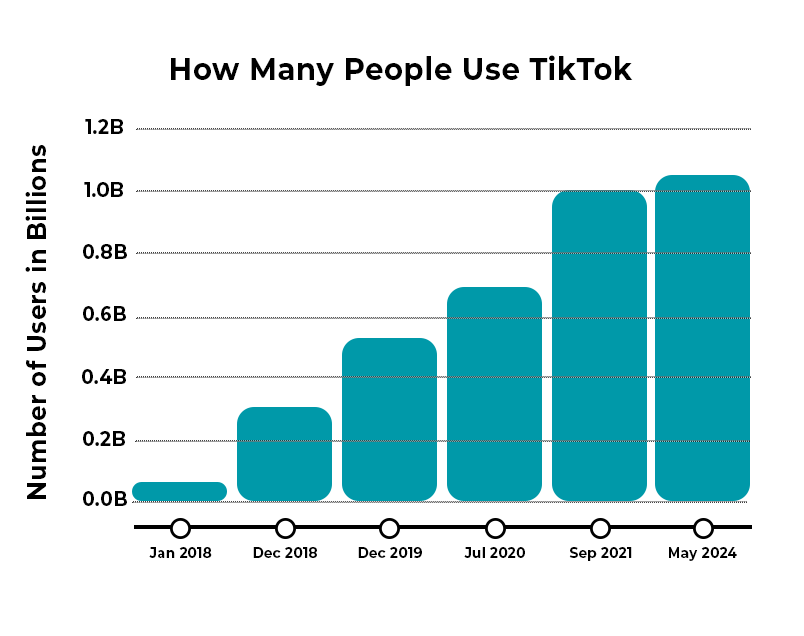
1. TikTok Currently Has More Than 1 Billion Monthly Users

Although it only launched officially in 2016 and just came to the United States in 2018, TikTok has rapidly become one of the most popular social media websites and apps in the world.  

As of 2025, the app has 1.12 billion monthly active users (MAUs), which makes it one of the most popular social media platforms behind Facebook (3.065 billion MAUs), YouTube (2.5 billion MAUs), WhatsApp (2 billion MAUs), Instagram (2 billion MAUs), and WeChat (1.38 billion MAUs). 

To give you an idea of just how popular TikTok is, here is how quickly it has grown in the last few years: 

TikTok usage graph

One of the main reasons why TikTok grew so much in 2018 and 2019 was its acquisition of Music.ly, a U.S.-based social media service that already had around 80 million users before it was bought.  

After the purchase, TikTok migrated all of these accounts over to its own platform, and this helped launch a revolution in the United States and also made TikTok the first Chinese-based app to be majorly successful in the U.S. 

2. TikTok Continues to Search for a Buyer

Despite its success among Americans as the fourth most popular social media app in the country, TikTok is in a legal limbo. 

A ban against the app was set to go into effect in January 2025 after U.S. lawmakers deemed the app a threat to American data, privacy, and security. According to the law, TikTok’s parent company ByteDance must sell its U.S. operations to a U.S. company or risk going dark forever. The platform was down for roughly 12 hours in January after ByteDance failed to precure a buyer before the ban’s deadline. 

President Donald Trump has extended executive orders delaying the ban twice, most recently in April 2025, by 75 days. While a buyer has yet to be announced, the White House continues to advocate for a sale over an outright ban of the app.  

3. TikTok Users Around the World

TikTok is originally a Chinese app, and it still gets most of its traffic from the Asia-Pacific region. In fact, around 296.8 million of its users come from Asia-Pacific countries, and around one-quarter of the app’s total downloads come from the Middle East and Africa.  

In China, the app is referred to as Douyin. The name TikTok was created once the app decided to expand beyond Chinese borders. For the sake of consistency, it has kept this name in its original market.  

While it seems like more Americans are on the app than ever before, North America accounts for a small percentage of the platform’s total users at just 11.8%. 

4. The Average TikTok User Spends Nearly an Hour Per Day on the App

Anyone who has ever used TikTok before knows that it can be addicting. Its algorithm has the unique capacity to find videos relevant to you and your interests, and its format of playing video after video keeps you engaged. 

This translates to the average user spending around 58 minutes and 24 seconds per day on the app. Users are spend twice the amount of time they were on the app in 2019. The average user spends about 23 hours and 30 minutes on TikTok each month – almost a full day!  

5. TikTok is One of the Largest Online Shopping Platforms

What used to be known as “the dancing app” has evolved into one of the world’s largest marketplaces on social media. In 2019, TikTok slowly introduced in-app purchases, which allow users to buy coins and other virtual items that give them special access to content. By 2023, TikTok Shop was introduced to brands and sellers to generate income by uploading curated products for users to discover and buy.  

More than 1/3 of American users have purchased or sold an item through TikTok shop, and 68% are open to purchasing through the platform. Americans have spend close to $32 million a day shopping on TikTok. The majority of products sold are health and beauty related.  

Watching videos of the product itself has a compelled a significant amount of users to purchase; more than 60% of users have purchased directly through the platform after seeing an advertisement. Nearly half of TikTok shoppers purchase an item once a month, with a majority of users (nearly 75%) claiming to feel a deeper connection to the brands they interact with on TikTok.  

6. 16,000 TikTok Videos are Uploaded Each Minute

If you’ve ever wondered why some videos you upload rake in few views and others hit the viewing lottery, it probably has to do with the sheer volume of videos, not just the TikTok algorithm.  

Every minute, 16,000 videos are uploaded to the app. That means that, in any given hour, TikTok users upload a little less than a million videos.  

However, while these numbers might seem shocking (and kind of are), some context is needed. Each video on TikTok is only 30-60 seconds long, and with more than 1 billion users, it’s easy to see how the number of videos quickly balloons to astronomical numbers, further proof that TikTok very much is the next internet sensation. 

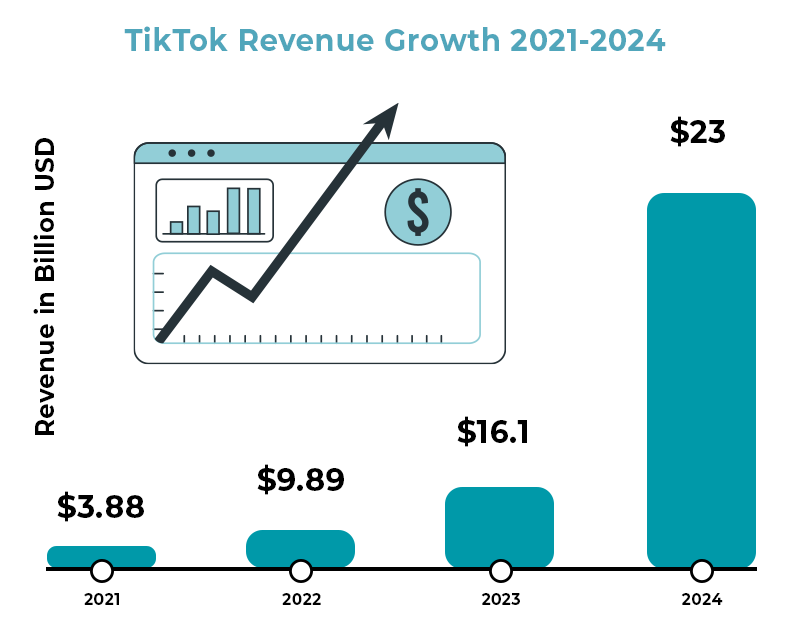
7. TikTok Revenue Hits $23 Billion in 2024

As one of the most popular and fastest-growing apps in the world, it comes as no surprise that TikTok is raking in the cash. Still technically a privately-owned company, exact figures are difficult to acquire, but reports claim the app generated about $23 billion revenue in 2024. About 77% of this revenue comes from advertising sales, a strategy used by pretty much every other social media app.    

This growth, however, is helping out more than just TikTok.  

Its parent company, ByteDance, made about $40 billion in 2024. However, there may be a change of hands soon as U.S. lawmakers ruled to ban the app unless it’s sold to a company in the U.S. or a country deemed friendly to the U.S. Though the deadline for a sale has been extended twice since the start of the year, pressure from the White House indicates a sale will happen sooner rather than later.  

8. Most TikTok Users Are Under 34

If you find yourself asking, “What’s a TikTok?” don’t be surprised if younger people laugh at you and call you a boomer. But also don’t feel bad. TikTok is very much a GenZ app. Around 1 in 4 TikTok users are under 20 years old. 

Another 35% are between 25-34, and then 19% are between 35 and 44.  People over the age of 45 account for around 27% of all TikTok users.  

Still, TikTok is very much a young person’s app, and this is part of the reason why it has become so popular in the U.S. Many people from younger generations don’t like Facebook or see it as an app that their parents use. Plus, TikTok is geared towards shorter, quirkier, and more creative videos, which appears to be what the younger generations want more. 

9. TikTok Produces High Engagement Rates

Another reason why TikTok is becoming more and more popular is that engagement on the app is much higher than it is with other social media apps. For those who don’t know, engagement refers to when someone likes or shares a post, or when they follow your account after seeing some of your content.  

TikTok engagement has seen a dip from previous years but clocks in at an average of 2.5% by follower count. Instagram is close behind with an average engagement rate by follower count at just 0.50%.  

10. The Most Followed TikTok Account has More than 160 Million Followers

One thing TikTok is doing more so than any other social media app (except perhaps YouTube) is turning people into stars. Because of its popularity, and also because of how easy it is to produce content, regular people are quickly becoming superstars on the platform.  

As of April 1, 2025, the most popular account on TikTok belongs to Khabane Lame with more than 162 million followers. His account is followed by Charli D’Amelio and MrBeast. How long this fame lasts remains to be seen; one aspect of TikTok is that people regularly fall in and out of popularity.  

However, given how successful some people have been with the app, it’s likely to encourage more and more individuals to download it and try and find their moment in the spotlight, something that can only improve TikTok’s popularity. 

The Next Facebook?

Based on these numbers, it’s clear that TikTok is here to stay. This isn’t just some fad that will die out in a few months. Instead, this app is a legitimate player in the world of social media and just might make a run at the top spots currently held by one of Meta’s four companies. But this is also far from a guarantee. Facebook has been at it for much longer, and TikTok does face the challenge of being based in another country. But if the internet world has taught us anything, it’s that things can change on a dime. It’s a roller coaster and all we can do is hang on tight. 

Think about the smartphone you’re using right now. What can it do? How much did it cost you, and what’s the ongoing cost? How many people share the same experience, and how many could go without one for any period? The influence of smartphones in today’s world continues to grow, and understanding their impact is crucial to understanding the modern digital landscape.

Here’s what you need to know about smartphones in 2025:

1. Global Smartphone Market Growth: Key Stats for 2025

As of 2025, there are approximately 7.43 billion smartphones worldwide. This is a significant increase from previous years, with smartphones making up the majority of these devices. This rapid growth shows how mobile technology is evolving, especially with the rise of 5G networks and advancements in mobile technology. Mobile app stores continue to generate billions each year, and investments in smartphone innovation are robust, with companies aiming to be the next leaders in a market that remains incredibly dynamic. 

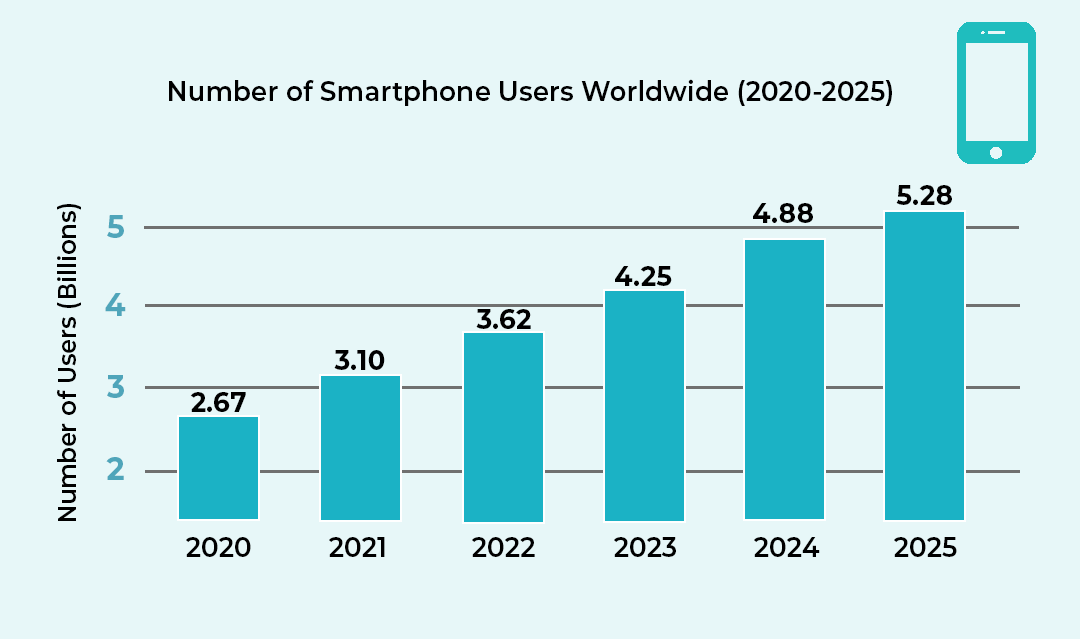
smarthgphone users graph

Comparatively, 8.31 billion mobile phones are currently in use worldwide. Exactly how quickly they’ll shift to a smartphone remains to be seen, but it will likely be as soon as they can afford it and have access to the technology. 

Based on predictions, by 2026 there will be 7.58 billion smartphones across the world. As a reminder, such a level of connectivity is unprecedented. 

2. Smartphone Usage Habits in 2025: How Much Time Do People Spend on Their Phones?

Smartphones have become essential for modern life—so much so that many people feel phone dependency. It’s rare to find someone without a mobile device, and the average person spends more than 4.5 hours per day on their smartphone. This dependency is more pronounced among younger generations, with the global smartphone penetration rate estimated to hit 90% in 2025. 

Smartphones aren’t just for communication; they’re integral to everything from mobile shopping to entertainment and work-related tasks. It’s no surprise that the average smartphone user checks their device 58 times a day, an increase from previous years. This trend indicates the growing reliance on smartphones for everything, from managing daily tasks to quick social media updates. 

Interestingly, smartphones are also replacing other electronic devices. While laptops and desktops remain relevant for heavy computing, smartphones have taken the lead in many categories like mobile shopping, where purchases made via smartphones continue to surge. 

3. Demographics of Smartphone Use: Who’s Using Smartphones in 2025?

While smartphone ownership is widespread in many parts of the world, there’s still substantial growth potential in emerging markets. In 2025, it’s anticipated that the global smartphone user count will reach 5.28 billion, with nearly every individual in developed countries owning a smartphone, and many in developing countries expected to follow suit soon. 

Let’s break down smartphone usage by demographic: 

  • Income: People with higher incomes are more likely to own high-end smartphones, while lower-income households tend to own older models or more affordable options. However, smartphone penetration across all income groups has surged in the past decade. 
  • Geography: Countries like Indonesia, Nigeria, and Vietnam are seeing rapid adoption rates, which are expected to further fuel the global smartphone market. Asia remains a focal point for the growth of mobile users with China coming in first place, but companies will also need to adapt to local needs and affordability to expand their reach effectively. 

4. 5G Technology and the Future of Smartphones in 2025

The transition to 5G technology is well underway, and by 2025, the global 5G user base is expected to exceed 2.5 billion. This enhanced connectivity is driving new opportunities for smartphones, such as faster downloads, improved mobile gaming experiences, and increased reliance on mobile for work and entertainment. 

Smartphones are also playing a pivotal role in the Internet of Things (IoT), connecting with smart devices from home security systems to wearables and beyond. By 2025, 75 billion IoT devices are expected to be connected, with smartphones being a central hub for many of these devices. 

5. Phones vs Other Electronics: Why Smartphones Are Dominating

When comparing phones vs other electronics, smartphones are taking a dominant role in the daily lives of consumers. In February 2025, mobile devices (including smartphones and tablets) accounted for 62.23% of global web traffic, while desktops contributed 35.91%. Tablets and computers are still crucial for certain tasks, but for many, smartphones have become the go-to device for almost everything. Among U.S. adults aged 18 to 34, over 70% primarily use mobile devices to access the internet, with 40% relying solely on smartphones. In contrast, only 28% of individuals aged 50 and above exhibit mobile-only online behavior. From browsing the web to checking social media, to shopping online and even managing financial transactions, phones are increasingly becoming a central hub for people’s daily lives. 

6. Smartphone Addiction: How Phone Dependency Is Changing Our Lives

Smartphone addiction is a growing concern in the digital age, with many individuals spending excessive time on their devices. As we become more reliant on our phones, issues such as mental health problems, sleep deprivation, and reduced productivity are emerging as side effects of phone dependency. In fact, 87% of smartphone users check their phones within one hour of going to bed, and 69% check them within five minutes of waking up. 

7. The Rise of Mobile Shopping: A Key Driver of Smartphone Growth

The mobile shopping industry is booming, with smartphones becoming the primary device for purchasing goods online. Mobile commerce is expected to account for 72% of all e-commerce sales globally by 2025. This shift in consumer behavior is driven by the convenience of shopping on-the-go, as well as the growing availability of mobile payment systems like Apple Pay and Google Wallet. 

8. Social Media and Smartphones: The Perfect Match

Smartphones have revolutionized how we use social media. With apps like Instagram, TikTok, and Facebook at our fingertips, smartphones have made social media access more ubiquitous than ever before. The rise of mobile-only social platforms has further fueled the shift towards smartphones as our main digital interface. 

  • Usage Trends: More than 99% of social media users access platforms via mobile devices, a figure that has steadily increased year-over-year. 

Conclusion: The Future of Smartphones in 2025 and Beyond

In 2025, smartphones are no longer just a luxury—they are a necessity. With mobile shopping on the rise and phone dependency becoming a part of modern life, smartphones are only expected to increase in importance. Their role in the Internet of Things and their ability to replace other electronics will continue to shape the future of technology. Whether you’re an individual, a developer, or a company, understanding this shift will be key to adapting to the tech landscape of tomorrow. 

If you’re reading this, you probably have some sort of problem with your internet connection. And with that, we deeply sympathize with your plight. It can be absolutely disruptive to a day, harm your work, and even be hazardous to your safety in some circumstances. The internet is a lifeline for many, especially after the pandemic showed us how much we have to rely on it at times.

And the internet can be tricky to work with. It feels like it’s working one moment and is cut out the next, and it’s tough to find clues about how the internet is not working when it is working (if temporarily). On top of that, your connection is based on several different parts and factors, many of which are outside of your direct control.

While fixing up your internet is a complex issue, we hope that you’ll be able to get more information from the following information. Go through the steps and see what you can do, before you pull your hair out with frustration.

Restart Your Equipment and Computer

Sometimes just resetting your computer, router, and related equipment solves the issue. It isn’t the most scientific approach to solving the problem, but it often works for one reason or another, and it is quick to try out (five minutes or less).

To reset your modem and router (or likely a combo), first, check the LED status light. Look for the internet signal light to be on, as well as a WiFi light if applicable. There might be several WiFi lights for the different bands of internet your modem uses. The lights should generally be flickering. If they are off or red, then something is wrong with that piece of equipment, and you should keep that in mind for later if resetting doesn’t work.

There may be a button on your modem and router to make it restart or reconnect, but in general, the way to restart your internet equipment is to unplug it. Wait ten seconds after doing so, and then plug it back in. It may take a few minutes to completely reboot, so don’t panic if your internet doesn’t turn on immediately.

Did this fix your internet issues? If so, that’s great! Keep an eye on things and make note of when you had to do a restart. If not, then you need to move onto the other possibilities.

You may also want to reset your computer and other related equipment. Sometimes it might have an issue accepting the signal, or your computer’s WiFi receiver may need a reboot. It’s necessary every once in a while anyway, so it cannot hurt in most cases.

Note that we only recommend restarting everything as a solution if it permanently solves the problem. If it only solves the problem for a short period of time, then you aren’t really fixing the problem and you should move onto the other steps. If you’re ISP thinks they’re solving the problem by telling you to reset things and then you keep having problems after the call is done, you need to press the issue on this point.

Diagnosing the Problem

So as was predictable if you’re reading this, restarting your equipment didn’t solve the problem. This means you must investigate the matter more, which we know is a chore. However, we are here to help you diagnose the problem, so note all the following:

One thing you will want to pay attention to is whether the disconnections, interruptions, or slowdowns occur at certain times of the day.

Try to see if you can localize the problem and notice if it is happening more on one device or in a certain area of the house. This can help better identify the problem if it is a hardware issue of one sort or another.

If you can (perhaps using a data plan), check online to see if there are reports of outages in your area. Perhaps a line was knocked down or there is a malfunction in a nearby area. If so, the problem will be resolved in time.

What type of problem do you have? Do you need to reset the router frequently? Do you regularly have issues staying connected to something that needs a constant connection (getting booted from a game just for you to reconnect in a few seconds is frustrating)? Do you get the feeling that your equipment is just not enough for the connection you are paying for? To fix the problem, you need to ask the right questions first.

Speed Tests

One thing you can do is perform a speed test. You’ll get information on whether there is a connection, how fast your connection is versus the advertised speed (more on that later), and  

There are several great speed test sites online, and for these purposes, any of the major ones will do. Make sure they have a server in your area and have minimal extra fluff on their main page that will interfere with the results. 

To run the best speed test possible, make sure you do the following: 

tips for running speed test
  • Try to perform a speed test at multiple times of the day. This way you can tell if there are slow hours. 
  • Try to perform a speed test from multiple areas around your house where you would use the internet. If there is interference, it might only show up in one place. 
  • Perform a speed test with multiple devices. Your smartphone and your computer will work just fine, especially if done from the same general location. This can rule out whether the problem is with your device instead of the entire internet infrastructure. 
  • Do it under normal operating conditions, meaning that you shouldn’t be doing any heavy online work or doing any major downloads while you are performing the test. It could interfere with the readings. 
  • Compare your download and upload speeds versus the advertised speeds of your ISP, especially if you are using an ethernet cable (WiFi users can experience some dropoff). Advertised speeds are usually mentioned as “up to X Mbps” but you should be getting at least 80 percent of your download speeds at most times. If you are consistently not, you should be investigating why or looking for another Internet provider. 

In general, what helps is taking as many notes as possible. You might not want to get too detailed with it as after a certain point it’s the ISP’s job to diagnose the problem, but knowing the potential sources makes everyone’s lives a lot easier. 

Using the Tools You Have

Use the tools that exist on your computer and possibly in your modem and router. Automatic troubleshooting has come a long way since the days of early dial-up. If you have a more advanced modem-router combo, you might have an app associated with your internet service or equipment. That app will be able to tell you quite a bit about your connection, including if there have been any problems lately. Results may vary, but it is likely a quicker diagnosis than relying on the ISP for help or trying to piece the problem out yourself. 

Now might be a great time to check to see what is available on your system and whether you think it will be of any help. 

When Your WiFi Is the Problem

If you ruled out your ISP or note quickly that there is something off with your equipment, then your WiFi is the problem. If an ethernet cable fixes everything but your smartphone connection doesn’t work through most of the house, then your WiFi is the problem. 

Your home may not be conducive to your current WiFi setup. There might be too many walls blocking the way, or some materials might be blocking the signal in ways you wouldn’t find in other homes. You probably shouldn’t remodel your home to get a better internet signal (but don’t let us stop you).  

What you can do is perhaps rearrange your setup to put your modem and router in a more central location. If your home is too big for your router’s current range, you can either upgrade your router or you can add additional nodes or a WiFi extender. They are not terribly expensive, and you can tune your setup and add extra extenders as needed to get maximum coverage. They do have their limits and they won’t be as good as a direct connection, but if you have something strong to start with you can easily work with them. 

However, sometimes you just need to replace your router or your modem/router combo to fix your connection. If you are provided one or rent one through your ISP, you’ll need to bring it up with them. You might be due for an upgrade. If you got it yourself, you can get another one for yourself and make the upgrade, ideally with some improvements to performance in the process so it’ll last you the next few years.  

Switching WiFi Bands

Most routers work over two different bands: 2.4GHz and 5GHz. The 5 GHz is faster but typically has less range, while the reverse is true for 2.4 GHz. When both work, some routers will use both bands to create the fastest possible speeds. There are also now even faster 6GHz bands, but they are not so commonly used yet (look out for them in the next few years). 

However, to get a better connection on your end, you might want to connect to one band or another from your device or change the settings on your router. If you are close to your router, try out the 5GHz band if you aren’t already connected. Far away on the other side of your house? Then try out the 2.4GHz band. However, this will not solve permanent problems, and you won’t be getting the most out of your router this way. We do not recommend you do this, although it can work in a short-term pinch or when you are far away from your router. 

Resetting Your Setup

Sometimes you don’t know what went wrong or what wrong button you pressed, but you want your internet back and you don’t want to worry about it anymore. In such cases, you might want to take the “admittedly extreme” option of resetting your network settings. 

To do so on your Mac computer, follow these instructions

To do so on your Windows computer, follow these instructions instead. 

Note that this can be a bit of a pain given that you are starting from scratch, but if there was a setting or bug that was causing your internet problems, this should fix it. Plan for some time to set up networks, network names, passwords, etc. again. 

Resetting Your Equipment

There is also the option to just restore your router and modem back to their factory settings, in case there were some options that were changed for the worse and you’re not sure what might work best. 

To do so, look for a tiny pin size hole in your equipment. You want to press a button that is on the inside of that hole. There might be something that came with the router to do so, but if you lost this (many of us do), then a pin or a toothpick will likely do the trick. If you do not see such a hole or are nervous about doing so, consult the manual that came with the router and/or modem. If these are long gone, then a search online should yield the manual you need, so long as you know the model of your equipment.  

Note that getting everything back to normal on top of this can take some time as well, and as such, you may need to wait. Schedule some time to read a book or clean the house while the equipment is sorting itself out. 

Is It Malware?

Cybersecurity is becoming ever more important to keep your information and your connection safe, and you might see your connection suffer if you’ve been neglecting it (or even if you haven’t). Malware can slow down your connection and your computer through its own ends (perhaps using your device as part of a botnet, etc.), and it can cause other issues. An unstable internet connection is bad. Identity theft is much worse. 

While there are plenty of cybersecurity protocols and habits you should be following, here are the ones most relevant to your internet connection:  

Regularly do a scan of your computers (and perhaps your smartphone) for viruses, malware, and the like. You should do so at least once a week, and whenever you feel there might be something interfering with your  

While there are debates as to whether a premium antivirus software is necessary or not, you should have some form of protection and should note that many of the free options (though not all) are not secure enough for your needs. Do your research here. 

Be careful of what you download and invite onto your device. There is little your protection software can do if you are opening the front door for threats. Don’t download files from unknown sources, and take advantage of opportunities to scan attachments in advance of opening an email or file. 

Is it Your Antivirus?

Ironically enough, many people have reported having trouble with certain downloads or their connections in general with their Antivirus program. While this is a risky move long-term, turning off your firewall might alleviate the problem, allowing you to better understand the cause. It could be a particular setting or one site you are trying to use sets off the alarms, despite you knowing it is perfectly safe (do make sure that it is perfectly safe). 

If your internet is entirely down, especially across the house, then this is almost certainly not the cause. But take this as a chance to review your settings and the program that you are using. 

Issues with Your IP Address

It is somewhat uncommon compared to the other issues, but your computer might be having issues configuring an IP address. You need an IP address, but for some reason there might be multiple of your devices using the same address, leading to conflicts. If you have more than one router on the same network (not a mesh network or a router and extenders, mind you), then this issue can pop up. 

We recommend checking to see if you have a valid IP address quickly to see if that’s the issue. 

Advanced Troubleshooting

If you’ve already gone through the basics and still have persistent internet issues, it’s time to dig a little deeper. These advanced troubleshooting techniques can help uncover more complex or less obvious problems—and give you a better chance at solving them without waiting endlessly on hold with your ISP. 

Check Device Logs and Router Log

1. Check Device Logs and Router Logs 
Most modern routers have a logging feature that tracks connection history, dropped packets, and internal errors. You may need to log in to your router through a web browser (usually something like 192.168.1.1 or 192.168.0.1) and dig through the settings to find system logs. These can help pinpoint if the problem is with your internet signal or your internal network. Look for repeated errors or disconnects at specific times. 

2. Run a Continuous Ping Test 
If your connection drops briefly or you notice lag, open a Command Prompt (Windows) or Terminal (Mac) and type: ping google.com -t (Windows) or ping google.com (Mac).  

Let it run for several minutes. If you see timeouts or massive spikes in response time, you likely have packet loss or high jitter—common signs of a weak connection or interference. 

You can also try ping your_router_ip (usually 192.168.1.1) to see if the problem is internal or external.  

3. Use Traceroute to Pinpoint the Problem 
Traceroute helps you find where your connection slows down or fails by mapping the path your data takes to reach a website. In the Command Prompt or Terminal, type: 
tracert google.com (Windows) or traceroute google.com (Mac/Linux).  

If there’s a big delay or failure at a specific hop, the issue could be with your ISP or somewhere along the broader network. 

4. Check for Bandwidth Hogs 
One rogue device or app can tank the entire network. Log in to your router and check the list of connected devices. See if any are using a large amount of bandwidth—especially unexpected ones like smart TVs, cloud backup tools, or unknown devices (which could be someone piggybacking on your network). 

5. Look for Firmware or Driver Issues 
Outdated firmware on your router or drivers on your devices can cause all sorts of strange problems. Check for firmware updates on your router’s admin page, and update your network adapter drivers through your device settings or manufacturer’s site. 

6. Test with a Static IP Address 
Sometimes DHCP issues (where devices are dynamically assigned an IP address) can cause instability. Assigning your device a static IP can bypass that. It’s a more advanced move, so look up your router’s configuration guide if you’re unsure. 

7. Interference from Nearby Networks 
In crowded areas, too many WiFi networks using the same channel can cause serious interference. Use a free WiFi analyzer app to scan for nearby networks and change your WiFi channel accordingly in your router’s settings. For 2.4 GHz, channels 1, 6, and 11 are typically best. 

8. Use Quality of Service (QoS) Settings 
If video calls or gaming are constantly getting interrupted by other devices downloading or streaming, set up QoS rules in your router. This prioritizes important traffic so that one user’s movie night doesn’t ruin another user’s Zoom meeting. 

General Ways to Improve Your Connection

Not having major issues, but still wanting an improved connection for streaming, gaming, or video calls? Try out the following if you want to make some improvements: 

  • Check the location of your router. Could anything be blocking it off, if only temporarily? Ideally, your router should be close to your device (just not too close), not be surrounded by other objects, and not be blocked off by too many walls and ceilings. If placement is an issue, you might want to invest in a different setup or get a range extender. A mesh setup can also work if you’re willing to invest more, but that’s only needed for very large homes or smart homes. 
  • No matter how you set up your router, a direct ethernet connection is going to be your best option for the fastest, most consistent connection. Nothing beats a direct line. 
  • Note that if you haven’t changed your ethernet cable in some time, then perhaps a simple cord is the cause of your internet issues. Change it out and see if things improve. 
  • Check to see if there are a bunch of background programs using up your bandwidth. While some apps mean well regularly updating, they can do so at inopportune times. 
  • While unlikely, make sure that your network is private and has a good password. You don’t want your neighbors to be leeching off of your connection unless you have a previous agreement. 
  • You may want to change your password for your WiFi if you haven’t done so in a long time. A little caution cannot hurt. 

Upgrade Your Internet Service

Perhaps your internet works perfectly fine for the service you paid for, but that just isn’t enough anymore. Apps and programs often require more bandwidth than ever before, and the 4k content on streaming services today requires a strong connection. What worked ten or even five years ago might not work now, and will not work as time goes on. 

There are certainly more advanced guides to finding a better internet service, and our guides can help you make a decision on who to go with. Just take your time with it, know how much speed you need (erring on the side of much faster to prepare for the future), and don’t be afraid to switch providers. Many ISPs will buy out old agreements to get a new customer. 

Conclusion

There are few things more frustrating than internet problems, especially when you feel as though you don’t have any control over the problem. But often you do have some measure of control, and we hope that you feel empowered to take control of your connection and fix what you need to. If things aren’t going well, take action and either adjust your setup or contact your provider. You deserve to have the best connection available, and we hope that you manage to solve your problems as soon as possible. 

If you’ve just run a speed test and are staring at the numbers on your screen wondering what they actually mean for your daily browsing, you aren’t alone. We understand that seeing a number that doesn’t match your expectations—or your monthly bill—can be frustrating. 

Internet speed test results can be confusing because they represent a snapshot of your connection’s maximum capacity at a specific moment, not necessarily the consistent speed you experience while watching Netflix or hopping on a Zoom call. To truly understand your internet performance, you need to look beyond the raw numbers and understand the relationship between bandwidth, speed, and congestion. 

What Is Internet Bandwidth?

When we talk about internet bandwidth, we are referring to the maximum amount of data that can be transferred over your network connection in a given amount of time. It is essentially the capacity of your connection. 

Think of bandwidth like a highway. The bandwidth is the number of lanes on that highway. A wider highway (higher bandwidth) allows more cars (data) to travel side-by-side simultaneously. This capacity is crucial for modern households where remote workstreaming 4K video, and online gaming happen all at once. 

If you have a narrow highway (low bandwidth) and try to push too much traffic through it, everything slows down. That’s why having sufficient bandwidth is critical for Zoom meetings and ensuring your video streaming doesn’t buffer constantly. 

Bandwidth vs. Internet Speed: What’s the Difference?

While they are often used interchangeably, the concepts of internet bandwidth vs speed are distinct. 

  • Bandwidth answers the question “How much?” It is the total capacity of the pipe. 
  • Speed answers the question “How fast?” It is the rate at which data moves through that pipe. 

To go back to our highway analogy: Bandwidth is the number of lanes, while internet speed is the speed limit (or how fast the cars are actually driving). 

It is important to understand the difference between download vs. upload speeds within this context. Most residential internet connection types—like cable or DSL—offer asymmetrical bandwidth, meaning you have a wide highway for downloading data but a narrow lane for uploading it. Gigabit internet via fiber, however, often provides symmetrical bandwidth, giving you maximum capacity in both directions. 

How to Understand Your Internet Speed Test Results

When you look at your results on TestMySpeed, you are seeing a real-time measurement of how your bandwidth and speed are performing together. Understanding internet speed metrics is the first step toward fixing a slow connection. 

Here is a breakdown of what you are looking at: 

  • Download Speed: How quickly your network can pull data from a server (loading a webpage, streaming a video). 
  • Upload Speed: How quickly you can send data (posting to social media, your video feed on a conference call). 
  • Latency (Ping): It’s the time it takes for a signal to travel from your device to the server and back. High latency causes lag, even if your speed numbers look high. 

If your results are lower than expected, check if your ISP is throttling your internet or if you aren’t getting the speed you’re paying for

Internet Speed Result Tiers: What Different Speeds Mean

Not sure if your result is “good”? Here is a quick guide to what different speed tiers typically handle.  

Find how much Internet Speed do you need

Your household may want faster internet speeds.

<50 Mbps

Great for individuals to browse the internet, check email, and other basic browsing.

50-100 Mbps

Great for streaming Netflix, videos, and online meetings.

100-200 Mbps

Great for streaming high quality videos, fast downloads, video games, and multiple devices.

200+ Mbps

Great for doing almost anything at ultra fast speeds.

How Bandwidth Affects Real-World Internet Speed

It is vital to remember that the bandwidth vs speed dynamic is affected by your environment. Bandwidth is a maximum limit, not a guarantee. 

Several factors can reduce your actual speeds below your bandwidth cap: 

  • Network Congestion: Just like rush hour traffic, internet traffic affects speed. If everyone in your neighborhood is online at 7 PM, your cable connection might slow down. 
  • Hardware: An old router or modem acts like a bottleneck, limiting the bandwidth that actually reaches your device. 
  • Connection Type: As explained in our guide to internet connection types, fiber is generally more consistent than DSL or satellite. 

How Multiple Devices & Concurrent Connections Impact Speed

The most common reason for “slow” internet isn’t always the provider—it’s the number of concurrent connections. 

Every device connected to your Wi-Fi takes up a lane on that bandwidth highway. If you are working remotely while the kids are gaming and the TV is streaming 4K, you are splitting your total bandwidth three ways. 

This division often results in high latency and buffering, because your capacity is maxed out. Even a fast connection can crawl if it’s overloaded. Understanding streaming data usage can help you manage these bottlenecks better. 

Managing Bandwidth for Better Performance 

If your internet speed test results are consistently low, optimization might help before you commit to paying for a pricier plan. 

  • Prioritize Traffic: Many modern routers allow you to prioritize bandwidth for specific devices (like your work laptop) using Quality of Service (QoS) settings. 
  • Upgrade Hardware: Ensure your router can handle the gigabit speeds if you are paying for them. 
  • Identify Slowdowns: Read up on the 15 reasons for slow internet to troubleshoot hidden issues like interference or background updates. 

FAQs: Understanding Internet Speed Test

FAQs: Understanding Internet Speed Test 

Why is my speed test slower than my internet plan? 
Speed tests measure real-time performance, which is affected by Wi-Fi interference, network congestion, and the capabilities of the device you are testing on. Wired connections usually yield results closer to your plan’s advertised speed. 

Is bandwidth the same as internet speed? 
No. Bandwidth is the total capacity (how much data can be moved), while speed is the rate of transfer (how fast the data moves). You need both for a smooth online experience. 

How many Mbps do I really need? 
For basic browsing, 25 Mbps is sufficient. For 4K streaming and remote work, aim for at least 100 Mbps. Households with 4+ heavy users should look for 200 Mbps or higher. 

Why does my internet slow down at certain times of day? 
This is likely due to network congestion, often called “peak hours” (usually evenings), when many people in your neighborhood are online simultaneously. 

Speed Test Are Only the Beginning

Your TestMySpeed results are a diagnostic tool—a way to peek under the hood of your connection. By understanding the balance between internet bandwidth and speed, you can decide whether you simply need to kick a few devices off the Wi-Fi or if it’s time to call your provider for an upgrade. 

Recommended Reading: 

If there’s anything to be learned from the pandemic, it is that most work can be done remotely. This has placed great demand on internet providers, bringing the question, “What is the best internet speed for remote work?” to the forefront. 

There’s no quick and easy answer to this question. The best internet speed will vary from user to user based on how much internet speed you need. It depends on the kind of work you do and the tasks you perform on a daily basis. Whatever your specialty may be, we’ve compiled a guide to determining the best internet speeds for remote workers to keep you connected and productive at home.

Minimum Internet Speed Required for Remote Workers

The Federal Communications Commission (FCC) recommends a minimum of 25 Mbps for households with more than one user. However, if you’re a remote worker, you’ll want to consider what tasks you perform daily, how frequently you multi-task, and if there are other people using the internet in your house.

While 25 Mbps is an ok speed for general use, we recommend investing in a high-speed internet plan of at least 100 Mbps download speed and 10 Mbps upload speed for remote work. This should support all online activities related to work, from file sharing, video conferencing, or chat.

According to the article “Work From Home Internet Speeds: Top 5 Fastest & Slowest States”, the average internet speed in metropolitan areas is 115 Mbps, while the average internet speed in suburban areas is 95 Mbps. This means that you should be able to find a provider that can offer you the speeds you need to work from home effectively.

What to Look For in Internet Plans

In addition to considering your online activity, having the following features in your internet plan may improve your work-from-home internet experience.

Connection Type

Speed isn’t the only consideration when searching for internet service. Another key element is the type of connection. We recommend cable or fiber internet over DSL internet and satellite internet because they offer faster speeds and many useful features. In addition to faster speeds, there tends to also be better network reliability and overall user satisfaction.

Unlimited Data

When you’re working from home, you’ll be using quite a bit of data throughout the day, even if it’s just reading and composing emails or using Slack. Many plans include data caps, which is the amount of data you are allowed as part of your monthly payment. If you exceed that allotment, service providers can sometimes throttle speeds and charge you overage fees. Take the worry out of this scenario and look for an internet plan that includes unlimited data or allows for an unlimited upgrade.

Symmetrical Speeds

Internet plans with symmetrical speeds have the same download and upload speeds. Download speed is usually faster than upload, because so much of what we do on the internet involves inbound data, like streaming and online gaming. And when you’re shopping for an internet plan, the speed advertised is always the download speed.

If you’re a remote worker or content creator that frequently uploads files to the internet, you will want to pay attention to this feature. Slower upload speeds can make a difference when it comes to meeting a deadline for a project. 

Free WiFi Hotspots

You’re living the remote work life, so why not make the most of it? Since you’re not tied to a physical location, but do need internet access, you have more freedom to work outdoors or in places like coffee shops. Since public WiFi networks can be questionable when it comes to privacy and security, we recommend using your internet provider’s WiFi hotspot. A few major internet providers including Xfinity, AT&T, and Spectrum offer free nationwide WiFi hotspots with their service, which are safer and more secure than public WiFi connections.

Data & Speed Requirements by Activity

The reason internet needs vary from user to user is because everyone performs different types of online tasks. To help you figure out what speed is best for your work-at-home scenario, here is a breakdown of common online activities and the speeds they require.

General Usage

ActivityData Per HourRequired Speed
Basic Web Browsing20 MB1 Mbps
Email50 MB1 Mbps
Social Media150 MB1 Mbps

Working

ActivityData Per HourRequired Speed
Telecommuting1 GB25 Mbps
Online Classes1 GB25 Mbps
File Downloading2-5 MB10 Mbps

Streaming Videos

ActivityData Per HourRequired Speed
SD Video Streaming1 GB4 Mbps
HD Video Streaming3 GB8 Mbps
Ultra HD 4K Video Streaming7 GB25 Mbps

Video Conferencing

ActivityData Per HourRequired Speed
SD Video Calls200 MB1 Mbps
HD Video Calls350 MB2 Mbps
HD Video Conferences1 GB6 Mbps

*Data sourced from FCC.com on 7/16/22.

Your Current Internet Service

Unless you are experiencing major disruptions with your current internet service, it is worthwhile testing your speed before looking for a new plan.

Keep These in Mind Before Running a Test

  • Internet service providers always advertise their network’s fastest speeds that are based on a wired connection.
  • Most devices connect to your home network wirelessly, which will be slower than a wired connection.
  • Different factors and materials can impact WiFi service in your home. If your speed test seems unusually slow, we recommend taking steps to improve your WiFi connection.

If you’ve taken these measures to improve your internet speed and are still getting slower speeds, it may be time to negotiate a faster speed with your provider or look for a new one.

What is a good internet speed? Should you pay for the top plan a provider has to offer, or can you get by with a cheaper, slower plan?

To answer these questions, first, run an internet speed test to see how your current connection is performing. Then, take a speed quiz to see if those speeds match your lifestyle needs. If they’re not, it may be time to upgrade your service.

Below we break down how to assess your internet and find the optimal speed for your home.

Assessing Your Internet Speeds

To figure out what internet speed you need, it’s important to understand how internet speed is measured. Internet speed — most commonly measured in megabits per second (Mbps) — is how fast data can travel between your devices and the internet. 

According to the Federal Communications Commission (FCC), broadband internet is defined as an internet plan with at least 25 Mbps download and 3 Mbps upload. Download speed is the rate at which data passes from the internet to a device, and upload speed is the opposite.

Sometimes download and upload speeds are symmetrical (i.e. fiber internet plans), and sometimes they’re different (i.e DSL internet plans). Because most online activities involve downloading data, download speed is the speed that’s prioritized and advertised in internet plans.

Minimum Speed Requirements

How much internet speed you need depends on how members of your home use the internet. You should consider your home size and internet usage before settling on a plan.

The FCC provides broadband guidelines that outline the minimum speeds required for common internet activities like streaming or gaming online. Typically, these download speeds range anywhere from 1 Mbps – 25 Mbps.

Network Limits & Users

While 25 Mbps download is useable, it gets used up quickly when there is more than one person at home connecting devices. To figure out the bare minimum speeds you need, we recommend multiplying 25 Mbps by the number of users in your family.

The demand on your internet connection can add up very quickly. It is very important to take an inventory of your needs and devices when calculating the internet speed you need.

Things to Know When Shopping for Internet

Now that you have an idea of the minimum speeds you need in your home, it’s time to start shopping. Here are some factors to help set your expectations and consider before committing to an internet provider or plan.

Types of Internet

Each type of internet connection has its own nuances that will affect speed and performance. Availability of each really comes down to where you live, but usually, homes have at least two connections to choose from.

Fiber internet is the fastest and most stable type but is less available than cable internet and DSL. Satellite and fixed wireless internet are mostly convenient solutions, especially for those in rural areas, as they can go where wired connections can’t. Whichever one you choose, be sure to run a speed test regularly to check your network performance.

Advertised Speeds vs Actual Speeds

Depending on which plan you choose, you’ll be allotted a certain amount of bandwidth per month. Your bandwidth lets you know the maximum download speed available for your connection at any given time. However, the speed you actually experience on a day-to-day basis often varies.

Your actual speeds will almost always be lower than the advertised speeds by anywhere from 10-30%. If you experience speeds slower than this, we recommend reaching out to your internet provider to help troubleshoot.

Wired vs Wireless Connection

The advertised speed is based on a wired connection. The best way to achieve the advertised speed is by using an ethernet connection. Unlike a wireless connection, an ethernet link limits where you can be in your house if you want to access the internet. That’s why most users connect to the internet via a wireless connection using a WiFi router.

When picking a provider, make sure their service comes with WiFi capabilities. Also, know where your wired access points are in the house in case you ever need to connect directly to the source. These two options will provide very different speed results.

Picking the Right Internet Plan

Picking the right internet plan all comes down to how you use the internet and where you live. Once you test your internet speed and find out what your family needs, you can start your search for the best internet provider near you.